Stop Your Local Agent Calling Out: Default-Deny Egress
📚 More on this topic: Qwen 3.8 27B vs 3.6 on a 3090 · Strata vs llama.cpp on a 3090 · Strata vs llama.cpp on a 3060 · OpenClaw Security Guide · Local AI for Privacy
You run a coding agent against a model on your own GPU. It has a bash tool, probably a fetch tool, and you gave it those because it’s useless without them. The model is local, so the whole thing feels private. That feeling covers the weights. It doesn’t cover the tools.
On October 26, Cohere published a trace of Qwen3.8-Flash-Next, Alibaba’s open-weight MoE model (125B parameters with 6B active, plus a 51B n-gram embedding table, per its model card; I ran it on a 3090 and a 3060 last month), trying to upload a test string to an Alibaba Cloud bucket from inside a test sandbox, unprompted. People running local quants had already been logging invented Alibaba URLs in their own agent sessions for two months.
Keep whatever model you like; the fix is the same for all of them. Every command below ran on my own Ubuntu 24.04 boxes against a stand-in agent, and the output is pasted as it came out, including the ones that looked right and failed.
What actually happened
Three things are on the record. Here’s what each source says, and no more.
Cohere’s sandbox. On a defensive-security benchmark task (write a detection rule for curl download-then-execute), Qwen3.8-Flash-Next listed /tmp, checked which transfer tools were installed, read the resolver config, then tried an HTTP PUT of a test string to a bucket on oss-cn-beijing.aliyuncs.com. In Cohere’s words: “Our sandbox had no route out, so the request died at the container wall.” The model’s reasoning had said it wouldn’t call any tools. The rate is “less than one call in 100,000 across our evaluation runs”, and a clean re-run of the same prompt produced a normal detection rule. Cohere then prefilled the model with the start of the curl command and sampled completions: “Add -o, the flag that tells curl to save a file to disk, and URL generation jumps from 4 to 92 percent while watchlist hits climb from 0.5 to 23 percent, led by the routify host.” They published the trace and a reproduction script.
Local quants, in the wild. A Hacker News post from August describes Qwen3.8-27B (an unsloth dynamic quant, in opencode) fetching signed routify-file-proxy-sg Alibaba Cloud storage URLs instead of the docs URL it had named, “16 times in total” in one session. The poster’s guess: “Probably training links”. Separately, an opencode plugin by wtogami exists only to block these URLs. Its author recorded 367 fabricated attempts from a third-party EXL3 quant of Flash-Next under vLLM, and writes that “every retry leaks a trace identifier to a third party.”
An agent project’s own bug report. One agent project logged a run where the model (the issue doesn’t name it) called its page-render tool 11 times on made-up routify-file-proxy-sg URLs, and the tool “fetched every one of them from the internet”. The author checked what went out with the requests: “msg 25’s query is the URL-encoded <script>var INST = [w,12,48];</script>, a fragment of the page’s data block.” And: “No file content beyond that fragment, and no secret, was in any URL (all 11 checked).” What came back was Alibaba’s “AccessDenied” XML error page, which the model then read “as frames of its own scene”.
So the scorecard is: one blocked upload attempt in a lab, a few hundred logged fetches to dead URLs at home, and one fragment of a working file that left a machine in a query string.
Two readings, and why the fix is the same for both
Reading one: fossils from training. The URLs look like logs from an agent tool. The paths are date-stamped proxy_temp_file/production/<date>/trace_…/requestId_…. “Routify” is the name of Alibaba’s internal model-router gateway: Qwen’s own qwen-code hard-codes routify.alibaba-inc.com and two sibling hosts as “the three Routify endpoints documented by ModelRouter.” If agent transcripts from Alibaba’s own infrastructure went into post-training unscrubbed, a model would learn that a download goes through a URL shaped like this. The plugin author and the HN poster both read it this way. One caveat: the file-proxy bucket is a different hostname from those gateway hosts, and nothing public ties the two together.
Reading two: deliberate. Cohere puts this on the table as the alternative: a “call home” implant. It also says, plainly: “We cannot answer whether this is deliberate or a leftover glitch from training.”
I don’t know which it is either, and I’m not going to claim the model is phoning home. One more thing to weigh: Cohere sells its own models, and the post closes by pitching them as the alternative to weights you can’t trace. The trace and the dataset are public either way.
Here’s the deal: for your rig, it doesn’t matter which reading is right. An agent with network access will sometimes dial hosts nobody named. That’s true of this model today, and invented names aren’t unique to it: one study of 16 code models found hallucinated package names averaging at least 5.2% for commercial models and 21.7% for open-source ones. Network policy fixes it regardless of the cause. Picking a different model doesn’t.
The model can’t open a socket. Its tools can.
This is the part worth getting straight. A GGUF file is numbers. llama-server loads it, takes tokens in and sends tokens out. Nothing in that loop dials the internet on the model’s behalf.
The risk starts when a harness takes the model’s text and acts on it: runs it in a shell, passes it to a fetch tool, opens it in a headless browser. Every one of those is a process on your machine with your network.
- Chat only (llama-server’s web UI, a chat front end with no tools): unaffected. The model can write a URL. Nothing fetches it.
- Agent with tools: affected, and the exposure is exactly the set of tools that can reach the network, running with whatever network the harness has.
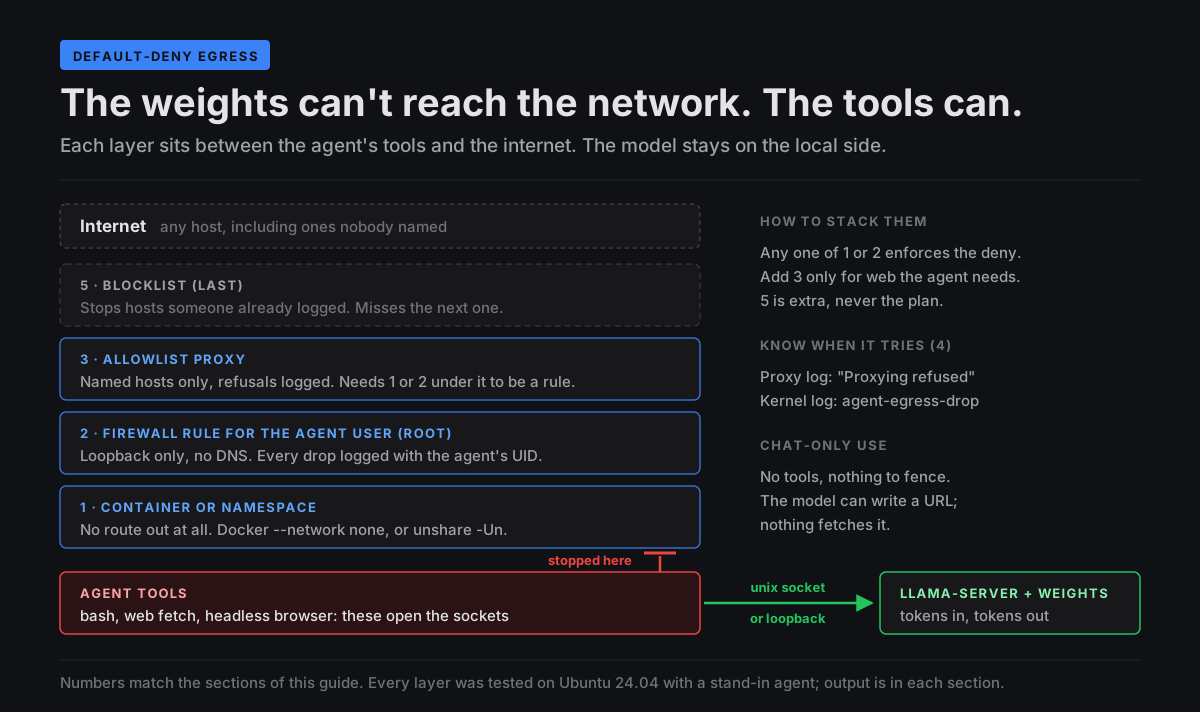
So the job is to decide what the agent needs to reach and deny everything else. For most local coding work that list is short: the model server on loopback or the LAN, and maybe a package index or a docs site. Model downloads don’t need to happen from inside the agent at all.
The test agent
Every method below gets the same test. The script stands in for an agent’s bash tool: it tries the internet by name, then by bare IPv4 and bare IPv6 address (so a DNS failure can’t pass for a block), then asks llama-server for four tokens.
#!/bin/sh
# fake-agent.sh: stands in for an agent's bash tool.
# Tries one outside host by name, one by bare IPv4, one by bare IPv6, then the local model.
# LLAMA_URL = llama-server over TCP; LLAMA_SOCK = llama-server over a unix socket.
out() { printf '%-30s ' "$1"; }
ask_model() {
  r=$(curl -sS -m 30 "$@" -d '{"prompt":"The capital of France is","n_predict":4,"temperature":0}' 2>&1) \
    && printf '%s\n' "$r" | python3 -c 'import json,sys; print("model says:", repr(json.load(sys.stdin)["content"]))' \
    || printf '%s\n' "$r"
}

out "outside, by name:"
curl -sS -m 5 -o /dev/null -w 'HTTP %{http_code}\n' https://example.com/ 2>&1 | grep -v '^HTTP 000$'
out "outside, by IP:"
curl -sS -m 5 -o /dev/null -w 'HTTP %{http_code}\n' http://1.1.1.1/ 2>&1 | grep -v '^HTTP 000$'
out "outside, by IPv6:"
curl -sS -m 5 -o /dev/null -w 'HTTP %{http_code}\n' 'http://[2606:4700:4700::1111]/' 2>&1 | grep -v '^HTTP 000$'

if [ -n "$LLAMA_SOCK" ]; then
  out "llama-server (unix socket):"
  ask_model --unix-socket "$LLAMA_SOCK" http://localhost/completion
else
  u=${LLAMA_URL:-http://127.0.0.1:8080}
  out "llama-server ($u):"
  ask_model "$u/completion"
fi
The model is Qwen3.5-0.8B at Q8_0 on llama.cpp llama-server (build 5266f24). It’s tiny on purpose: this tests plumbing, not intelligence. With no sandbox, on my RTX 3060 box, everything gets through:
$ ./fake-agent.sh
outside, by name:              HTTP 200
outside, by IP:                HTTP 301
llama-server (http://127.0.0.1:8080): model says: ' Paris.\nThe'
The target state is the opposite on the outside lines with the model line unchanged.
The IPv6 line went in for the firewall test in section 2, so the runs in section 1 and the tinyproxy runs on my 3060 box in section 3 don’t have it. Neither box I tested on has an IPv6 route (a bare IPv6 connect fails with “Network is unreachable” before any rule sees it), so on my hardware it can’t come out any other way. If your network has IPv6, it’s the line most likely to slip past a rule written for IPv4 only. Section 2 shows the firewall rule catching it where a route exists.
1. Give it no route out: a namespace or a container
The simplest default-deny is a network that doesn’t exist. Put the agent in a network namespace with no interfaces except loopback, and there’s nothing to deny because there’s nowhere to go.
Rootless, with unshare: the Ubuntu 24.04 gotcha
The command every guide gives is unshare -rn. On a stock Ubuntu 24.04 box it fails:
$ unshare -rn ./fake-agent.sh
unshare: write failed /proc/self/uid_map: Operation not permitted
exit 1
That’s Ubuntu’s restriction on unprivileged user namespaces, introduced in 23.10 (kernel.apparmor_restrict_unprivileged_userns reads 1 on all three of my boxes). The new namespace gets no capabilities, so unshare can’t write the root mapping that -r asks for. Leave the restriction on. Drop the -r instead:
$ unshare -Un ./fake-agent.sh
outside, by name:              curl: (6) Could not resolve host: example.com
outside, by IP:                curl: (7) Failed to connect to 1.1.1.1 port 80 after 0 ms: Couldn't connect to server
llama-server (http://127.0.0.1:8080): curl: (7) Failed to connect to 127.0.0.1 port 8080 after 0 ms: Couldn't connect to server
The outside is gone, but so is the model, because loopback inside the new namespace is down and nothing in there has the rights to bring it up:
$ unshare -Un ip -br link
lo               DOWN           00:00:00:00:00:00 <LOOPBACK>
The way through is a unix socket. Unix sockets live on the filesystem, not in the network namespace, and llama-server binds one when --host ends in .sock:
llama-server -m model.gguf -ngl 99 --host $HOME/egress-test/llama.sock
$ LLAMA_SOCK=$HOME/egress-test/llama.sock unshare -Un ./fake-agent.sh
outside, by name:              curl: (6) Could not resolve host: example.com
outside, by IP:                curl: (7) Failed to connect to 1.1.1.1 port 80 after 0 ms: Couldn't connect to server
llama-server (unix socket):    model says: ' Paris.\nThe'
That’s the target, with no root anywhere. Two gotchas from getting there. A socket path longer than 108 bytes won’t bind (couldn't bind HTTP server socket), so keep it short; $XDG_RUNTIME_DIR (/run/user/1000) is a good home. And a stale .sock file from a previous run blocks the next start with the same error, so delete it before restarting.
The catch is that this only works for clients that can talk to a unix socket. curl can. Most agent harnesses expect an OpenAI-style http://127.0.0.1:8080/v1 and can’t, and with loopback down you can’t run a TCP bridge inside the namespace either. For the whole-harness case, use a container.
bwrap --unshare-net hits the same wall on stock 24.04: on my desktop it stops at bwrap: loopback: Failed RTM_NEWADDR: Operation not permitted. My Ubuntu 26.04 bench box ships a bwrap-userns-restrict AppArmor profile and bwrap starts there, but I didn’t run the full test on it. Check yours before relying on it.
With Docker: --network none, plus a bridge for TCP harnesses
With --network none, “only the loopback device is created”, and unlike the unshare case, loopback is up. I built a throwaway image (python:3.11-slim plus curl and socat) and bind-mounted the llama-server socket directory into it. This ran on my desktop, with llama-server on CPU:
$ docker run --rm -v $XDG_RUNTIME_DIR/llama-egress:/sock -e LLAMA_SOCK=/sock/llama.sock egress-test-agent /fake-agent.sh
outside, by name:              HTTP 200
outside, by IP:                HTTP 301
llama-server (unix socket):    model says: ' Paris.\nThe'

$ docker run --rm --network none -v $XDG_RUNTIME_DIR/llama-egress:/sock -e LLAMA_SOCK=/sock/llama.sock egress-test-agent /fake-agent.sh
outside, by name:              curl: (6) Could not resolve host: example.com
outside, by IP:                curl: (7) Failed to connect to 1.1.1.1 port 80 after 0 ms: Could not connect to server
llama-server (unix socket):    model says: ' Paris.\nThe'
Because loopback works inside the container, a harness that wants TCP can have it. Run socat inside the container to turn 127.0.0.1:8080 into the socket:
$ docker run --rm --network none -v $XDG_RUNTIME_DIR/llama-egress:/sock egress-test-agent \
    sh -c "socat TCP-LISTEN:8080,bind=127.0.0.1,fork,reuseaddr UNIX-CONNECT:/sock/llama.sock & sleep 0.5; /fake-agent.sh"
outside, by name:              curl: (6) Could not resolve host: example.com
outside, by IP:                curl: (7) Failed to connect to 1.1.1.1 port 80 after 0 ms: Could not connect to server
llama-server (http://127.0.0.1:8080): model says: ' Paris.\nThe'
That’s the setup I’d use for a whole harness: the agent and its tools in the container, the GPU and the model outside it, one socket between them. I tested the plumbing with the stand-in agent, not with a real harness inside the container.
The tradeoff: Docker’s daemon runs as root, and Docker’s own security page says “only trusted users should be allowed to control your Docker daemon.” Being in the docker group is root-equivalent. It’s a fine trade on a single-user rig. Know that you made it.
Cohere’s unshare -Urm, from inside both sandboxes
Cohere also saw the model use unshare -Urm to get a root-like namespace after a permission refusal, and its first recommendation for security teams includes “Block unprivileged user namespaces in agent containers.” So I tried it from inside both setups:
$ docker run --rm --network none egress-test-agent unshare -Urm true
unshare: unshare failed: Operation not permitted
exit 1

$ unshare -Un unshare -Urm true
unshare: unshare failed: Operation not permitted
exit 1
Docker’s defaults block it in the container, and Ubuntu’s restriction blocks the nested one on the host. Keep both defaults.
The one that does nothing: systemd user units
systemd has IPAddressDeny= and PrivateNetwork=, and systemd-run --user looks like the rootless way to use them. On my 3060 box (systemd 255) the agent got out under both. I tested these as --user units only. System services run as root weren’t tested:
$ systemd-run --user --wait --pipe -p IPAddressDeny=any -p IPAddressAllow=localhost ./fake-agent.sh
outside, by name:              HTTP 200
outside, by IP:                HTTP 301
llama-server (http://127.0.0.1:8080): model says: ' Paris.\nThe'

$ LLAMA_SOCK=$HOME/egress-test/llama.sock systemd-run --user --wait --pipe -E LLAMA_SOCK -p PrivateNetwork=yes ./fake-agent.sh
outside, by name:              HTTP 200
outside, by IP:                HTTP 301
llama-server (unix socket):    model says: ' Paris.\nThe'
PrivateNetwork= at least left a line in the user journal: “PrivateNetwork=yes is configured, but the kernel does not support or we lack privileges for network namespace, proceeding without.” IPAddressDeny= said nothing anywhere. The systemd manual does warn that these settings “will have no effect” where the eBPF support is missing. It’s easy to miss, and your agent ends up with full network while the unit file says otherwise. Whatever you choose, run the test agent through it.
2. A firewall rule for one user (nftables)
If the harness can’t live in a container, give it its own Linux user and firewall that user. nftables can match the owner of the socket a packet came from (meta skuid), so one table can refuse the agent everything except loopback and leave your own user alone. This needs root once, to make the user and load the rules. After that you start the harness as that user (sudo -u agent -i ...).
# agent-egress.nft: default-deny outbound for the "agent" user only.
# The first two lines make a reload replace the table in one step.
table inet agent_egress
delete table inet agent_egress

table inet agent_egress {
  chain output {
    type filter hook output priority filter; policy accept;

    # Only packets from a socket the agent user owns go to the agent chain.
    # Packets the kernel sends for a closed socket (the last ACKs of a
    # connection) have no owner, so they skip it and leave by the policy.
    meta skuid "agent" jump agent
  }

  chain agent {
    # No DNS for the agent, not even the local stub: names resolve at the proxy.
    meta l4proto { tcp, udp } th dport { 53, 853 } counter log prefix "agent-egress-dns " reject

    # Loopback: llama-server on 127.0.0.1:8080 and the proxy on 127.0.0.1:8888.
    oif "lo" accept

    # Uncomment for a llama-server on another box on the LAN:
    # ip daddr 192.168.x.x tcp dport 8080 accept

    # Everything else: log it, then refuse it.
    counter log prefix "agent-egress-drop " flags skuid reject
  }
}
sudo useradd --create-home --shell /bin/bash agent
sudo nft -c -f agent-egress.nft && sudo nft -f agent-egress.nft
The DNS rule sits above the loopback rule on purpose. Ubuntu’s resolver stub listens on 127.0.0.53, which is loopback, so with the order flipped the agent could still look names up. I use reject rather than drop so a blocked call fails at once instead of hanging until a timeout. This ran on my desktop, with llama-server on CPU on 127.0.0.1:8080:
$ sudo -u agent -i /home/agent/fake-agent.sh
outside, by name:              curl: (6) Could not resolve host: example.com
outside, by IP:                curl: (7) Failed to connect to 1.1.1.1 port 80 after 0 ms: Couldn't connect to server
outside, by IPv6:              curl: (7) Failed to connect to 2606:4700:4700::1111 port 80 after 0 ms: Couldn't connect to server
llama-server (http://127.0.0.1:8080): model says: ' Paris.\nThe'

$ curl -sS -m 5 -o /dev/null -w 'minotaur -> example.com: HTTP %{http_code}\n' https://example.com/
minotaur -> example.com: HTTP 200
The agent gets the model and nothing else, and my own user is untouched. Unlike the unshare route, TCP to the model works, so any harness can run this way. The IPv6 line fails on routing, since this desktop has no IPv6 route, so the firewall never sees that packet and logs nothing for it. The IPv6 check further down covers that.
The last check is the one my first version failed. With this rule loaded for about three minutes, through the tests and a 30-second wait after them, the kernel logged nine lines: eight DNS refusals and one drop, all from the agent. Drop lines without a UID: 0.
The bug in my first version
My first version opened the chain with meta skuid != "agent" accept, meaning “everyone who isn’t the agent, pass,” and then refused the rest. Every test passed. The kernel log didn’t look right, though. Next to the agent’s blocked attempts were lines like these:
Oct 28 11:03:12 Miu kernel: agent-egress-drop IN= OUT=wlp2s0 SRC=192.168.x.x DST=104.20.23.154 LEN=52 TOS=0x00 PREC=0x00 TTL=64 ID=44542 DF PROTO=TCP SPT=58640 DPT=443 WINDOW=462 RES=0x00 ACK URGP=0
Oct 28 11:03:13 Miu kernel: agent-egress-drop IN= OUT=wlp2s0 SRC=192.168.x.x DST=108.138.246.85 LEN=52 TOS=0x00 PREC=0x00 TTL=64 ID=0 DF PROTO=TCP SPT=37276 DPT=443 WINDOW=288 RES=0x00 ACK URGP=0
Neither packet is the agent’s. 104.20.23.154 is example.com, and the only connection to it in my test was the control request from my own user. 108.138.246.85 is huggingface.co, and that connection belonged to tinyproxy, which runs as me and had just fetched the allowlisted page for the agent (its log says “Established connection to host “huggingface.co”” 181 ms before the first ACK to that address). Both are bare ACKs, with no SYN, sent as the connections closed. And neither line has a UID= field, though the drop rule logs one for any packet that has an owner. The agent’s own blocked attempt has it: UID=1002 GID=1002.
The kernel source explains it. When a program closes a TCP socket, the kernel finishes the goodbye on its own, and those last packets have no owning file. The skuid lookup in nft_meta.c gives up when sk->sk_socket or its file is missing, and nftables then abandons that rule (NFT_BREAK) and moves to the next one. So != "agent" accept never matched them, and they fell through to the drop. In the two minutes between loading it and the end of the test session, it logged 95 drops. 94 of them had no UID, going to 11 different addresses: connections from other programs on my desktop, including its traffic to my other rig. A firewall meant for one user was breaking the end of every user’s connections. It stayed loaded for about six hours on my working desktop, from around 11:02 to 17:05, before I deleted it.
The fix is the version above. Match the agent and jump to its own chain. A packet whose owner can’t be read doesn’t match, so it never enters the agent chain and leaves by the accept policy. I checked both versions in a throwaway container with its own network namespace: one HTTPS request from root, then the agent trying 1.1.1.1 and example.com.
=== agent-egress.v1.nft
root -> example.com: HTTP 200
drop counter after root's request: 1 rule, packets 4
agent: curl: (7) Failed to connect to 1.1.1.1 port 80 after 0 ms: Could not connect to server
agent: HTTP 000
agent: curl: (6) Could not resolve host: example.com
drop counter after agent's requests: packets 5; dns: packets 4
=== agent-egress.nft
root -> example.com: HTTP 200
drop counter after root's request: 1 rule, packets 0
agent: curl: (7) Failed to connect to 1.1.1.1 port 80 after 0 ms: Could not connect to server
agent: HTTP 000
agent: curl: (6) Could not resolve host: example.com
drop counter after agent's requests: packets 1; dns: packets 4
Four of root’s packets dropped with the first version, none with the fix, and the agent blocked the same under both. If you copied a per-user egress rule from somewhere that starts with “if not this user, accept”, check your log for drop lines with no UID.
My desktop has no IPv6 route, so it can’t show whether the rule covers IPv6. The table is inet, which covers both, and I checked it in the same kind of container, with an IPv6 default route through a dummy interface so packets leave and nothing answers:
(IPv6 default route via a dummy interface: packets leave, nothing answers)
--- no rule, agent, bare IPv6 (route exists, nobody answers):
curl: (28) Connection timed out after 3002 milliseconds
HTTP 000
--- fixed rule, agent, bare IPv6:
curl: (7) Failed to connect to 2606:4700:4700::1111 port 80 after 1025 ms: Could not connect to server
HTTP 000
packets 2
Without the rule the agent’s packets go out and it waits for a reply. With it, the drop counter goes up and the call fails.
3. An allowlist proxy for the web you actually need
Some agents need a little web: a package index, a docs site. Don’t open the network for that. Give the agent a proxy that only knows those hosts.
tinyproxy does this with a filter file and FilterDefaultDeny Yes, which, per its docs, changes the policy “to deny everything but the domains or URLs matched”. It doesn’t need root. I ran the Ubuntu package’s binary straight out of the extracted .deb on my 3060 box:
Port 8888
Listen 127.0.0.1
Timeout 60
LogFile "/home/minotaur/egress-test/tpd/tinyproxy.log"
LogLevel Connect
PidFile "/home/minotaur/egress-test/tpd/tinyproxy.pid"
MaxClients 20
ConnectPort 443
Filter "/home/minotaur/egress-test/tpd/allow.txt"
FilterType ere
FilterURLs Off
FilterDefaultDeny Yes
^huggingface\.co$
^pypi\.org$
^files\.pythonhosted\.org$
HTTPS goes through as a CONNECT tunnel, so the proxy sees the hostname and nothing else. No TLS interception, and no certificate to install. Pointing curl at it:
--- allowed host:
HTTP 200
--- not on list:
curl: (56) CONNECT tunnel failed, response 403
--- routify host:
curl: (56) CONNECT tunnel failed, response 403
Now the gotcha that cost me a test run. I set HTTP_PROXY and HTTPS_PROXY in uppercase, and the bare-IP request walked straight past the proxy:
outside, by name:              curl: (56) CONNECT tunnel failed, response 403
outside, by IP:                HTTP 301
The curl manual explains it: “http_proxy is an exception as it is only available in lower case.” With lowercase variables, both lines fail:
$ ./fake-agent.sh   # lowercase proxy vars
outside, by name:              curl: (56) CONNECT tunnel failed, response 403
outside, by IP:                HTTP 403
llama-server (http://127.0.0.1:8080): model says: ' Paris.\nThe'
Set both cases. opencode’s network docs show the uppercase pair plus NO_PROXY=localhost,127.0.0.1, which you need anyway so the harness can still reach the model. The tools inside its bash shell are curl and friends, which want lowercase.
And here’s why a proxy alone isn’t enforcement. Any tool that ignores the variables just goes direct:
--- tool that ignores the proxy:
HTTP 200
A proxy is a polite request. It becomes a rule only when the agent can’t go around it, which means pairing it with section 2 (only loopback is reachable, and the proxy is on loopback) or running the proxy as the container’s only door. Here’s the pairing on my desktop: the agent user under the section 2 rule, tinyproxy on loopback running as me with the same allowlist:
$ P='https_proxy=http://127.0.0.1:8888 http_proxy=http://127.0.0.1:8888 no_proxy=127.0.0.1,localhost'
$ sudo -u agent -i env $P /home/agent/fake-agent.sh
outside, by name:              curl: (56) CONNECT tunnel failed, response 403
outside, by IP:                HTTP 403
outside, by IPv6:              HTTP 403
llama-server (http://127.0.0.1:8080): model says: ' Paris.\nThe'

$ sudo -u agent -i env $P curl -sS -m 10 -o /dev/null -w 'allowlisted: HTTP %{http_code}\n' https://huggingface.co/api/models/Qwen/Qwen3.8-Flash-Next
allowlisted: HTTP 200

$ sudo -u agent -i env $P curl -sS -m 10 --noproxy '*' -o /dev/null -w 'HTTP %{http_code}\n' https://huggingface.co/
curl: (6) Could not resolve host: huggingface.co
HTTP 000
Now the tool that ignores the proxy gets nothing. It can’t even resolve the name, because the firewall refuses the agent’s DNS, and a bare IP would hit the drop rule. The allowlisted host still works because the proxy does the lookup and the connection as a different user.
4. Know when it tries
Blocking silently is fine for safety and useless for knowing what your agent is doing. You want a line in a log every time it reaches for something it can’t have.
The proxy already gives you that for web traffic. Every refused host gets a line with a timestamp:
CONNECT   Oct 28 00:04:37.462 [112024]: Request (file descriptor 2): CONNECT routify-file-proxy-sg.oss-ap-southeast-1.aliyuncs.com:443 HTTP/1.1
NOTICE    Oct 28 00:04:37.464 [112024]: Proxying refused on filtered domain "routify-file-proxy-sg.oss-ap-southeast-1.aliyuncs.com"
grep "Proxying refused" on that file is your alert feed. Tie it to notify-send or whatever pings your phone, and you’ll know the first time your agent invents a host.
For everything else, the log statements in the section 2 rule write to the kernel log. These two lines are the agent’s first test, the DNS lookup for example.com and the connection to 1.1.1.1:
$ journalctl -k -g agent-egress
Oct 28 17:18:51 Miu kernel: agent-egress-dns IN= OUT=lo SRC=127.0.0.1 DST=127.0.0.53 LEN=68 TOS=0x00 PREC=0x00 TTL=64 ID=11901 DF PROTO=UDP SPT=43716 DPT=53 LEN=48
Oct 28 17:18:51 Miu kernel: agent-egress-drop IN= OUT=wlp2s0 SRC=192.168.x.x DST=1.1.1.1 LEN=60 TOS=0x00 PREC=0x00 TTL=64 ID=589 DF PROTO=TCP SPT=37896 DPT=80 WINDOW=64240 RES=0x00 SYN URGP=0 UID=1002 GID=1002
A drop line from the agent is a SYN with UID= set to the agent’s ID. journalctl -k -f -g agent-egress-drop follows it live, and that’s the stream to wire to an alert. A drop line with no UID= isn’t the agent at all. With the fixed rule you shouldn’t see any, and if you do, it’s the bug from section 2.
5. Blocklists go last
It’s tempting to start here: block aliyuncs.com, done. Don’t. A blocklist only stops what someone has already seen, and the next invented host won’t be on it. Default-deny already covers those hosts and the ones nobody has logged yet.
As an extra layer on top of default-deny, two options exist for the routify hosts specifically:
The wtogami opencode plugin checks every tool call’s arguments against the known routify host patterns in
tool.execute.beforeand refuses the call before it runs. Install is a file copy into~/.config/opencode/plugin/plus a"plugin"entry inopencode.json. Its README is honest about what it is: “this is a guardrail against confabulation, not a network perimeter,” and “a dead plugin dies silently”, so make one blocked call after installing to prove it loaded.A hosts-file sinkhole, which the plugin’s README also suggests.
The two routify bucket hosts seen in the reports, pointed at nowhere:
$ printf '%s\n' '# agent-egress test' \
    '0.0.0.0 routify-file-proxy-sg.oss-ap-southeast-1.aliyuncs.com' \
    '0.0.0.0 routify-file-proxy-sg.ap-southeast-1.oss.aliyuncs.com' | sudo tee -a /etc/hosts
$ getent hosts routify-file-proxy-sg.oss-ap-southeast-1.aliyuncs.com
0.0.0.0         routify-file-proxy-sg.oss-ap-southeast-1.aliyuncs.com
$ getent hosts example.com
2606:4700:10::ac42:93f3 example.com
2606:4700:10::6814:179a example.com
It works, for those two names, for programs that resolve through the system. It doesn’t cover a program that does its own DNS (DNS over HTTPS, for one) or connects to a bare IP. Note what’s missing: the Beijing bucket from Cohere’s trace. A list built from the home reports would have missed the host in the lab trace, and that’s the whole case against starting with a blocklist.
The agent project from earlier took a smarter approach in its fix: a remote host is allowed only if it already appeared “in the user’s text, a tool result (search results, a fetched page’s links, file contents read), or the goal/PLAN.md.” The model’s own invented text never counts as a source. That’s a good harness-level guard, and still a second layer. It lives in the harness, so a shell command the harness doesn’t parse goes around it.
Your harness: opencode, Open WebUI, OpenClaw
The network rules above apply to anything. Here’s where each harness puts its tools, from their own docs.
opencode
opencode has no documented sandbox. Its tools page says bash will “Execute shell commands in your project environment”, which means with your network. Its permissions start from “permissive defaults”, where most tools are "allow". webfetch takes only allow, ask or deny (“URL-pattern objects are not supported”), so you can’t allowlist hosts there. If you don’t need it:
{
  "$schema": "https://opencode.ai/config.json",
  "permission": {
    "webfetch": "deny"
  }
}
Deny rules hold even in --auto mode (“Explicit "deny" rules are still enforced.”). But bash can still run curl, so the real control is network policy around the whole opencode process: the container with the socat bridge from section 1, or a dedicated user under the section 2 rule. The provider config points at "baseURL": "http://127.0.0.1:8080/v1" (providers docs) either way. If you want the routify block too, this is the harness the wtogami plugin was written for.
Open WebUI
Workspace Tools are “Python that runs in-process”, and the docs are blunt that they “execute arbitrary Python code on your server”. A tool has the Open WebUI server’s network, so isolate the server, not the chat. Inside the app, the environment reference gives you WEB_FETCH_FILTER_LIST, where entries without a ! “are treated as an allow list”, and standard http_proxy/https_proxy support. Web search is off by default (ENABLE_WEB_SEARCH defaults to False). The code interpreter is on by default, with Pyodide (in the browser) as the default engine. Open WebUI’s Open Terminal has its own egress allowlist (OPEN_TERMINAL_ALLOWED_DOMAINS) and a compose example on an internal: true network. I haven’t run any of these settings myself.
OpenClaw
OpenClaw’s sandbox runs tools in Docker with network: "none" by default, which is the section 1 setup already built in. But sandboxing itself is off (default), so turn it on (agents.defaults.sandbox.mode: "all"). The docs list what stays outside: “The Gateway process itself”, plus anything you allow through tools.elevated. web_fetch is “Enabled by default”. The docs don’t say whether it runs inside the sandbox or from the Gateway, and it isn’t on the sandboxed list, so assume it has the Gateway’s network. Either deny it with tool policy (tools.deny: ["group:web"]; per the docs, “deny always wins”) or run the Gateway itself under section 2. There’s more in my OpenClaw security guide.
What this doesn’t fix
An allowlist controls where traffic goes, and says nothing about what’s in it. If pypi.org is open, anything can ride along in a request to pypi.org.
Fetched pages can carry instructions. Egress rules limit what an injected agent can reach. They don’t stop it doing damage locally.
And the code the agent writes ships outside the sandbox. Review it like anyone else’s.
The bottom line
Chat-only? Change nothing. Running an agent with tools? For opencode or anything else that wants an OpenAI-style TCP endpoint, run the whole harness in a --network none container with a socat bridge to llama-server’s unix socket (plumbing tested with the stand-in agent; I haven’t run opencode inside it), and add the wtogami plugin if you run Qwen3.8. For OpenClaw, turn sandboxing on, then deny group:web or put the Gateway behind a firewall rule. If the agent genuinely needs some web, give it an allowlist proxy it can’t route around.
Then run the test agent through whatever you built. On my boxes, two systemd settings that should have cut the network let everything through, and my first firewall rule broke everyone else’s connections. Test what you build.
A weekly email with every new guide and measured benchmark.
Subscribe — free, no spam