Inkling 975B vs Your 3090: The Real Memory Math (2026)
📚 Related: How to Run GLM 5.2 Locally · Best Way to Run Qwen 3.6 35B MoE Locally · China Made Open Source a Strategy · MoE Models Explained
Thinking Machines dropped Inkling on July 15. Apache 2.0, full weights on Hugging Face, no gate, no waitlist, no acceptable-use rider. By every definition the local AI crowd has been asking for since 2023, this is the good outcome. Open won.
Then you look at the repo. The BF16 checkpoint is 1.9 terabytes.
That’s the shape of 2026. The open frontier keeps delivering exactly what we asked for, and the models keep arriving in sizes that have quietly stopped being about us. Inkling at 975B. GLM 5.2 at 753B. And Kimi K3 at 2.8 trillion, announced hours after this piece first went up and shipped on schedule eleven days later — a model that takes the argument below and doubles it.
None of them run on a 3090. Not one.
So let’s do the math nobody else is doing. Every site on the internet is publishing “Inkling is here!” today. Here’s what 975B actually costs you in memory, and where the real entry point sits for each of these models. Then the part that keeps this honest: why your position tonight is exactly as good as it was last week.
What actually shipped
Inkling is a Mixture-of-Experts transformer: 975B total parameters, 41B active per token, 66 layers, 6 of 256 routed experts plus 2 shared on each token. 1M context. Pretrained on 45 trillion tokens of text, images, audio and video. It takes text, images and audio in, and emits text only. Video was a pretraining diet, not an input you can use. All of that is straight from the model card.
One wrinkle worth knowing before you quote the headline number: Hugging Face’s own metadata for the repo counts 952B parameters, not 975B. TML says 975B, and Artificial Analysis’ model-size chart independently lists Inkling at 975B total / 41B active, so two of the three sources agree and the odd one out is HF’s own repo metadata. The gap is probably an embedding or expert-counting convention. It’s a rounding argument, not a scandal — but don’t cite 975B as though HF corroborates it, because it doesn’t.
The benchmark story is where it gets interesting, and where the press releases stop being useful. Artificial Analysis put Inkling at 41 on its Intelligence Index and called it the leading open-weights release from a U.S. lab. True. That “U.S.” is carrying a freight train.
| Model | AA Intelligence Index | Origin |
|---|---|---|
| GLM 5.2 | 51 | Z.ai (CN) |
| Kimi K2.6 | 44 | Moonshot (CN) |
| Inkling | 41 | Thinking Machines (US) |
| DeepSeek V4 Flash | 40 | DeepSeek (CN) |
| Nemotron 3 Ultra | 38 | NVIDIA (US) — prior US leader |
Inkling is the best open model America has produced. It is fourth on this list. On Terminal Bench 2.1 it posts 63.8% against GLM 5.2’s 82.7% in TML’s own comparison table, a gap of 18.9 points against a model that’s been out for a month. (Artificial Analysis independently scores GLM 5.2 at 78 on that benchmark rather than 82.7, which would make the gap about 14. Either way Inkling loses, and I’d rather show you both numbers than pick the flattering one.) Kimi K2.6 also beats it there, 71.3% to 63.8%, so “beats Kimi on agentic tasks” is true on some rows and false on others, depending which table you’re selling.
AA’s Omniscience eval clocks Inkling’s hallucination rate at 63%, with 40% accuracy. It costs $1.87 in / $4.68 out per million tokens against GLM 5.2’s $1.40/$4.40 and DeepSeek V4 Flash’s $0.14/$0.28, and that Inkling price is currently running at a limited-time 50% discount. It is the most expensive model on the list, and the third-smartest.
To Thinking Machines’ considerable credit, they say this out loud, in their own announcement:
“Inkling is not the strongest overall model available today, open or closed.”
I checked that quote against the raw page source rather than trusting a summary of it. They really wrote that. A lab shipping a 975B model and telling you in the launch post that it isn’t the best is doing something rarer than the model.
The size reality
At BF16, Inkling’s Hugging Face repo is 1,904.8 GB. There’s an NVFP4 checkpoint at 592 GB. Nobody outside a serving company touches either.
So you quantize, which is the whole reason a model this size is discussable at all. TML worked with Unsloth for llama.cpp support, and the GGUF repo went up day one. These are live file sizes, pulled fresh:
| Quant | Size | What you’re getting |
|---|---|---|
| UD-IQ1_S | 270.2 GB | 1-bit. The floor. Visibly dumber. |
| UD-IQ1_M | 285.0 GB | 1-bit. |
| UD-Q2_K_XL | 317.3 GB | 2-bit. Usable in a pinch. |
| UD-Q3_K_XL | 432.8 GB | 3-bit. Still feels like Inkling. |
| UD-Q4_K_XL | 587.0 GB | 4-bit. Near-indistinguishable. |
| Q8_0 | 856.8 GB | Effectively lossless, effectively pointless. |
| BF16 | 1,894.3 GB | The thing nobody runs. |
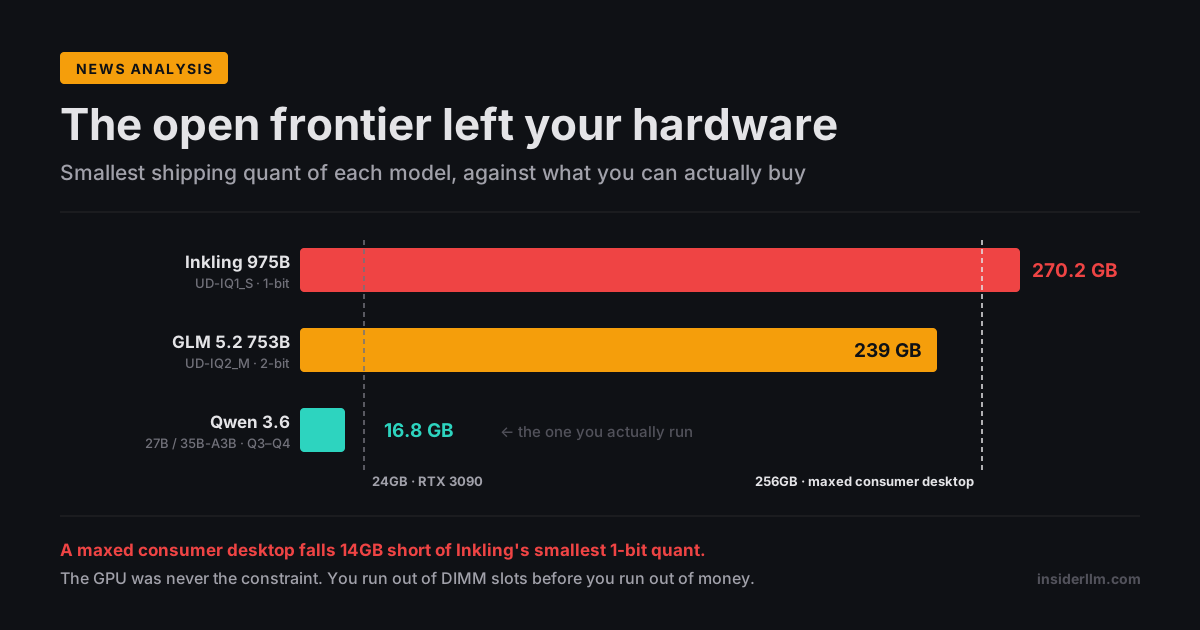
Now the number that matters. Not the 1.9TB. That one’s easy to dismiss as a datacenter problem and move on. The one that matters is 270.2 GB, the smallest quant Unsloth ships. That’s the floor — Inkling wearing every compromise available to it.
Where the real entry point sits
Here’s the part I haven’t seen anyone write.
A modern consumer desktop (AM5, four DIMM slots) tops out at 64GB per stick. Four sticks, 256GB. That is already an exotic and expensive configuration that almost nobody reading this owns.
256GB is 14 gigabytes short of the smallest Inkling quant that exists.
Read that again, because it reframes the whole thing. There is no GPU you can buy that fixes this. Your 3090 isn’t the problem. A 5090 isn’t the problem. Four 5090s aren’t the problem either. The expert-offload trick that makes huge MoE models reachable, pinning the routed experts to system RAM with -ot "exps=CPU" while attention and the KV cache stay on the card, only turns “needs 270GB of VRAM” into “needs 270GB of something.” And a consumer platform cannot physically hold 270GB of anything. You run out of DIMM slots before you run out of money.
Inkling doesn’t need a better graphics card. It needs a different class of motherboard. Threadripper, Epyc, Xeon: eight or twelve DIMM slots, registered ECC memory. That’s the entry ticket, and it’s a platform decision, not a GPU upgrade.
What that costs right now, in a memory market that has roughly tripled since the shortage began: DDR5 is running $12–14/GB, and registered ECC is worse. 256GB of DDR5 RDIMM is about $9,200 on NeweggBusiness today. To clear Inkling’s 1-bit floor with headroom you want 384GB, call it $14,000 in RAM alone, and what you have bought for that money is the privilege of running a 1-bit quant slowly.
The GPU path is worse:
| Target quant | Size | RTX Pro 6000 96GB cards | GPU cost |
|---|---|---|---|
| UD-Q2_K_XL | 317.3 GB | 4 | ~$53,000 |
| UD-Q3_K_XL | 432.8 GB | 5 | ~$66,250 |
| UD-Q4_K_XL | 587.0 GB | 7 | ~$92,750 |
At $13,250 per card on NVIDIA’s own listing, up 55% from launch MSRP because GDDR7 is scarce, the quant that “still feels like Inkling” is a five-card, $66,000 machine before you buy a chassis.
And the escape hatch everyone reaches for is gone. The Mac Studio was the honest answer to this class of problem for two years: one quiet box, unified memory the GPU can address, 512GB if you paid for it. Apple pulled the 512GB config in March 2026 and the 256GB by May. The 128GB went at some point after that; Apple never announced when. Today the biggest Mac Studio you can order new is 96GB, at $5,299. An M3 Ultra that costs $1,300 more than it did in the spring, for a fraction of the memory. And this wasn’t only config trimming — on March 26 Apple discontinued the Mac Pro outright, deleting the 192GB machine that sat above the Studio, with no replacement planned. The only Mac that goes higher than 96GB now is a laptop: the M5 Max MacBook Pro still configures to 128GB, which makes a notebook Apple’s highest-memory Mac. It’s no workstation substitute, running 614 GB/s of memory bandwidth against the M3 Ultra’s 819, and 128GB doesn’t reach Inkling’s 270GB floor anyway. The “just buy a big Mac” path to giant MoE models didn’t get expensive. It stopped existing.
Here’s the whole article in one table:
| Model | Smallest shipping quant | Size | What actually holds it |
|---|---|---|---|
| Kimi K3 2.8T | none yet (weights shipped Jul 27, still no GGUF) | ~776 GB projected | Moonshot’s own answer: 64+ accelerators |
| Inkling 975B | UD-IQ1_S | 270.2 GB | Threadripper/Epyc, 384GB RDIMM (~$14K of RAM) |
| Inkling 975B (decent) | UD-Q3_K_XL | 432.8 GB | 512GB workstation, or 5× Pro 6000 (~$66K) |
| GLM 5.2 753B | UD-IQ2_M | 239 GB (~245 GB RAM) | 256GB workstation (~$9.2K of RAM) |
| Inkling-Small 276B | not shipped yet | ~123 GB projected at 3-bit | 128GB workstation — if it lands as expected |
| Qwen 3.6-35B-A3B | UD-Q3_K_XL | 16.8 GB | Your RTX 3090. Tonight. |
| Qwen 3.6-27B | Q4_K_M | 16.8 GB | Your RTX 3090. Tonight. |
16.8 GB against 270.2 GB. The open frontier is 16× past the card most of us run, at its most compromised setting.
The one row worth watching is Inkling-Small: 276B total, 12B active. TML says, again verbatim, “We are currently finishing the testing of Inkling-Small and will release its full weights once that work is complete.” The weights aren’t out (the HF repo 404s), so the ~123 GB above is my projection from Inkling’s own bytes-per-parameter ratio, not a measurement. Treat it as an estimate and hold me to it when the real files land. But if it comes in near that, Inkling-Small at 3-bit is a 128GB workstation model. Still not a 3090. Considerably less absurd than $66,000.
The MoE trap: fast if you can hold it
There’s a tempting misread of MoE models that I want to kill before it costs someone money.
41B active on 975B total sounds like salvation. Only 41B of parameters fire per token, so the arithmetic per token is 41B-class, genuinely quick. People see that and conclude Inkling is somehow a “41B model with a big closet.”
It isn’t. Active parameters set your compute. Total parameters set your memory bill. The router can pick any 6 of 256 experts for any token, so all 975B have to be resident and reachable. There is no partial load. You pay for the whole model to sit there and use 4% of it per token.
Worse, the moment you solve the memory problem with system RAM instead of VRAM, the speed advantage you were promised evaporates. Those expert lookups now cross the DDR5 bus, and RAM bandwidth becomes the bottleneck rather than the GPU. On the GLM 5.2 path, same architecture story at 40B active on 753B total, RAM-offloaded inference lands in low single-digit tokens per second. Fine for batch jobs you kick off before bed. Miserable for anything you sit and watch.
So the MoE promise is real but conditional: it runs fast if you can hold it in fast memory. Holding it in fast memory is the entire problem, and it’s the problem MoE doesn’t solve.
Kimi K3 is this trap in its purest form. The model card puts it at 104B activated of 2.8T total, which is 3.7% of itself per token — sparser than Inkling’s 4.2%, though only modestly. Per-token arithmetic that light should feel quick, and on Moonshot’s own supernodes it does. But sparsity is a compute discount, never a memory one: the router can reach any of those 896 experts on any token, so all 2.8 trillion parameters have to be resident and reachable regardless. The leaner the activation ratio gets, the more brutal the joke becomes, and K3 asks you to hold something in the region of three quarters of a terabyte in fast memory so it can use under 4% of it at a time. That’s not a model you can meet halfway. Miss the memory bar and you don’t get a slower K3; you get no K3.
Kimi K3: this whole argument, at three times the size
Moonshot announced K3 on July 16, hours after this piece first went up, and committed to open weights in the launch post itself. The wording carries weight:
“The full model weights will be released by July 27, 2026.”
Not “we intend to.” Not “we’re exploring.” A declarative sentence with a date on it, from a lab that has open-weighted K2, K2.5, K2.6 and K2.7-Code — all 1T total, 32B active, all under Modified MIT, which is a real license with real conditions and is emphatically not MIT. Four straight releases, and the fifth has a delivery date.
So the precedent didn’t break. Which means K3 is now the single best example of the thing this article is actually about.
Run the numbers. K3 is 2.8 trillion total parameters, using what Moonshot calls Stable LatentMoE, “effectively activating 16 of 896 experts.” Two ratios come out of that and they are not the same number: 1.79% of the experts fire per token (16 of 896), while 3.7% of the parameters do (104B of 2.8T, from the model card). Against Inkling’s 2.34% of experts and 4.2% of parameters, K3 is the sparser model on both measures, by a modest margin. 1M context, native vision on the way in. The weights landed July 27 as promised, making it the largest open model ever released, by a factor of nearly three over Inkling.
And then, in the same post, Moonshot tells you what it takes to run:
“We recommend deploying Kimi K3 on supernode configurations with 64 or more accelerators.”
Sixty-four accelerators. That is the vendor’s own deployment guidance, in the launch post, for a model it is about to hand you for free. “You can download it but you cannot use it” isn’t my editorializing anymore. It’s the spec sheet.
What 2.8T actually costs in memory
The weights exist now, but I haven’t found a K3 GGUF from any of the usual quantizers yet, so the table below is still projection rather than measurement and I’ll show my work. I took Unsloth’s real, measured Inkling file sizes, derived actual bytes-per-parameter at each quant, and scaled to 2.8T:
| Quant | Inkling 975B (measured) | Effective bits/param | K3 2.8T (projected) |
|---|---|---|---|
| UD-IQ1_S | 270.2 GB | 2.22 | ~776 GB |
| UD-Q2_K_XL | 317.3 GB | 2.60 | ~911 GB |
| UD-Q3_K_XL | 432.8 GB | 3.55 | ~1,243 GB |
| UD-Q4_K_XL | 587.0 GB | 4.82 | ~1,686 GB |
| BF16 | 1,894.3 GB | 15.54 | ~5,440 GB |
The floor is roughly 776 GB. Not the BF16 number, not the datacenter number — the floor. K3 wearing every compromise 1-bit quantization can inflict on it still wants three quarters of a terabyte.
What the release added, and what it didn’t settle. Now that the weights are public there are published figures to check that projection against, and they disagree with each other. Some coverage puts the native MXFP4 download around 594 GB; other write-ups say around 1.4 TB. Those cannot both be right, and the arithmetic says so: 2.8T parameters at four bits is about 1.4 TB, whereas 594 GB across 2.8T works out to roughly 1.7 bits per parameter, which is below what MXFP4 stores. The repo is gated behind an accepted-terms click, so I haven’t read the file listing myself, and I’m not going to pick a winner on the strength of secondary sources that are copying each other. What I’ll say is that the projection above sits between the two, and that the conclusion is the same at either end: the low figure is still 24× an RTX 3090 and 2.3× a maxed 256GB desktop. I’ll replace this whole table with measured sizes the day a GGUF ships.
Some claims worth checking against that, since both are circulating:
“Even a 1.58-bit quant won’t fit in 512GB of RAM.” I get the same answer, and the arithmetic is not close. A flat 1.58 bits across 2.8T parameters is 553 GB of weights alone — already 41 GB past a 512GB box before a single byte of KV cache. And 1.58-bit is optimistic: Unsloth’s actual IQ1_S ships at 2.22 effective bits once you account for the parts that can’t be crushed, which is how you get to 776 GB. A 512GB machine — a machine almost nobody owns — is short by about 264 GB. Confirmed, and worse than advertised.
“An RTX 6000 Pro 96GB is more than 12x short.” This one’s only true if you pick the right quant, so here’s the honest ladder: it’s 8.1x short at the 1-bit floor, 9.5x at 2-bit, 12.9x at 3-bit, 17.6x at 4-bit. The “>12x” figure is a 3-bit claim wearing no label. At the floor it’s 8x, which is damning enough without the rounding.
Against every ceiling that matters:
| Your hardware | Capacity | K3’s 776 GB floor is… |
|---|---|---|
| RTX 3090 | 24 GB | 32× too big |
| Mac Studio (biggest you can now order) | 96 GB | 8.1× too big |
| MacBook Pro M5 Max (Apple’s largest-memory Mac) | 128 GB | 6.1× too big |
| Maxed AM5 desktop, 4×64GB | 256 GB | 3.0× too big |
| 512GB workstation | 512 GB | 1.5× too big |
Inkling was this morning’s worst case at 270.2 GB. K3’s floor is 2.87× that. The bar didn’t move. It left the building.
The counterweights, because K3 isn’t a clean win
The temptation with a model this loud is to only run the flattering numbers. Three that cut the other way:
It hallucinates more than the model it replaces. This is the number that should follow K3 around, and almost no coverage is carrying it. On AA-Omniscience, K3’s accuracy climbed to 46% from K2.6’s 33% — a real, large gain — and its overall Omniscience Index went 6 → 18. But over the same generation its hallucination rate went 39% → 51%. It gets considerably more right and makes considerably more up, and it now fabricates on more than half the questions it faces. Frontier scale bought knowledge here; it did not buy reliability.
One disclosure on that figure, because the inversion is ours and you should be able to check it: AA charts the non-hallucination rate — 61% for K2.6, 49% for K3 — and we’ve subtracted from 100 to state it as a hallucination rate. Same number, read the direction that matters to you. A 49% non-hallucination rate means the model is wrong more often than not when it commits to an answer.
Moonshot concedes the experience gap itself, in its own launch post:
“Despite being a highly competitive model overall, K3 nonetheless exhibits a noticeable gap in user experience compared with Claude Fable 5 and GPT 5.6 Sol.”
It’s mid-pack on speed. Artificial Analysis clocks K3 at 62 output tokens/sec, ranked 89th of 189 models — not fast, but worth noting it’s quicker than K2.6’s 47.2, so the “K3 is slow” line going around overshoots. AA does flag it as very verbose: 130M output tokens to complete the Intelligence Index against a 63M median. In fairness, K2.6 burned 170M against a 92M median, so K3 uses fewer tokens in absolute terms — it’s just still running about twice its peer group. You pay per token, and it uses a lot of them. Which brings us to the part nobody’s pricing out.
The other thing that changed: K3 is not cheap
Here’s a comparison I haven’t seen anyone run. Put Moonshot’s last two generations side by side, off Artificial Analysis’ own pages:
| Kimi K2.6 | Kimi K3 | Change | |
|---|---|---|---|
| Input / 1M tokens | $0.95 | $3.00 | 3.2× |
| Output / 1M tokens | $4.00 | $15.00 | 3.75× |
| Total params | 1,000B | 2,800B | 2.8× |
| Active params | 32B | 104B | 3.25× |
One generation apart. For most of the last two years the Chinese open-weights labs played a specific role in this market: roughly frontier-adjacent capability at a fraction of Western pricing. That was the entire pitch, and DeepSeek V4 Flash still honors it at $0.14/$0.28 — K3 costs 21× its input and 54× its output.
K3 doesn’t play that role. At $3.00/$15.00 it is priced like a Western frontier model, because it now performs like one. That’s coherent — but it means the reflex “the Chinese model will be the cheap one” just stopped being reliable, in the same release that made Moonshot competitive at the top of the board. The cheap option and the frontier option used to be the same models. They aren’t anymore.
“Open weights” now has a score, and it isn’t flattering
The license gap above isn’t just my pedantry, and this is the part I’d most like you to take away. Artificial Analysis publishes an Openness Index — 0 to 100, higher is more open — that grades releases on more than whether a download link exists. Here’s their board, from K2.6’s own page:
| Model | Openness Index |
|---|---|
| Nemotron 3 Ultra (NVIDIA) | 83 |
| DeepSeek V4 Pro / Flash | 50 |
| GLM-5.2 / 5.1 / 4.7 (Z.ai) | 44 |
| gpt-oss-120b (OpenAI) | 39 |
| Kimi K2.6 (Moonshot) | 33 |
| Kimi K2.7-Code | 28 |
| MiniMax-M2.7 | 22 |
Read that carefully. Kimi K2.6 is an open model — Modified MIT, weights on Hugging Face, no gate. Everything the local AI crowd asks for. And it scores 33 out of 100 on an independent measure of openness, less than half of NVIDIA’s Nemotron. K2.7-Code scores 28.
That’s the whole argument of this article, handed to you as a number instead of an opinion. “Open weights” is a spectrum wearing a binary’s clothing. A download link is the floor of openness, not the ceiling, and Moonshot sits in the bottom third of a board made up entirely of models that cleared that floor.
And K3? At the time of writing it wasn’t on the chart at all, because AA classed it proprietary while the weights were still promised rather than published. That reason has now expired. The weights shipped on July 27 under the Kimi K3 License — MIT-derived, with a Model-as-a-Service clause and a scale-attribution clause that only engage past $20M revenue or 100M monthly active users. Several outlets printed “Apache 2.0” for this release; the repo does not say that. The full breakdown, and why “open weights” is the accurate label here while “OSI open source” is not, is in Kimi K3 & Qwen 3.8: Open Weights You Can’t Run. So K3 belongs on this board and should pick up a score. Whatever number it lands on, it will be scored on a scale where its own predecessor — genuinely, unambiguously open — managed 33. I’d watch that figure closely, because the licence’s revenue thresholds are exactly the kind of condition an openness index is built to price in.
Where it genuinely delivers: AA puts K3 at 57 on its Intelligence Index, 4th of 189 — ahead of Claude Opus 4.8 (56), behind GPT-5.6 Sol (59) and Claude Fable 5 (60). And Arena’s own leaderboard has K3 at #1 in Frontend Code with 1,679 points, beating Fable 5 — a 17-place jump from K2.6’s #18. An open-weights model at the top of a blind human-preference coding board is a first, and it’s not a small one.
For this page’s argument, the delivery changes nothing and proves everything. The memory math on this page was written against a model that might not arrive. It arrived, on time, under terms that genuinely let you use it. The floor is still three quarters of a terabyte.
So the trend line is a single line, and it’s steeper than it looked when this page went up on July 16: the open models keep shipping, and they keep getting further out of reach. K3 is the proof. It’s the most open thing on the list and the least attainable, simultaneously.
Meanwhile, on your 3090: absolutely nothing happened
Now the part that keeps this honest, because the doom read of everything above is wrong.
You didn’t lose anything this week. Go check. Qwen 3.6-27B, Apache 2.0, 262K native context, dense, 16.8 GB at Q4_K_M from Unsloth (18.0 GB from bartowski; the repos genuinely differ by about a gigabyte on embedding handling, so use bartowski’s number if you’re calculating what fits). It runs on a 3090 with roughly 6GB left for KV cache, which at its 64 KB/token works out to about 90K of context. It claims 77.2 on SWE-bench Verified, level with Sonnet 4.5.
Or Qwen 3.6-35B-A3B, the MoE, 35B total and 3B active. UD-Q4_K_XL is 22.4 GB, and on a single 3090 our own run measured 157.66 tok/s (UD-Q4_K_M, up to 8K depth; community figures at long context run ~80-101). That’s a tight fit, under a gigabyte of headroom once the weights are in, so if you want long context, drop to UD-Q3_K_XL at 16.8 GB. Here’s the nice part: this model’s hybrid attention means only 10 of its layers are full attention, so its KV cache costs about 20 KB per token. Twenty kilobytes. That 6GB of headroom buys you north of 256K of context on a six-year-old card.
Updated 2026-10-13: originally said we benched ~101 tok/s on a single 3090. That was the community figure; our own run measured 157.66 tok/s, as of October 2026 (full dataset: /benchmarks/).
Both are vision-capable, incidentally, which most coverage of them forgets to mention.
That’s the same hardware you had in June, running the same models at the same speed, doing the same work. The tier that serves you is healthy, Apache-licensed, and fits with room to spare.
What changed isn’t your position. It’s who the headlines are for.
For about three years, a frontier open-model release was aimed at you. Llama 2 70B, Mixtral, the early Qwens. Those landed and the immediate question was “what quant fits my card,” and there was always an answer. That era is over. When Inkling lands at 975B, the honest answer to “what quant fits my card” is none of them, and also that was never the question this model was built to answer. Inkling is aimed at labs and at the people renting H200 nodes. Its openness is real and it matters: for researchers, for auditors, for the outfits that will fine-tune it, for the principle that frontier weights can exist in public at all. It’s just not aimed at your desk.
That’s a loss of relevance, not a loss of capability. Those feel identical when you’re reading launch coverage. They are not remotely the same thing, and conflating them is how you end up believing you got locked out of something you actually still have.
What to do about it
Running local tonight? Nothing changes. Qwen 3.6-27B for coding, 35B-A3B if you want speed and long context. 16.8 GB either way. Stop reading launch posts for hardware advice.
Want to use Inkling? Rent it. $1.87/$4.68 per million, currently half off, from Together, Fireworks, Modal, Databricks or Baseten. The weights are Apache 2.0 and genuinely yours, which is worth something real. Just not $66,000 of Blackwell.
Actually building a box for this class of model? Buy DIMM slots, not GPUs. The platform is the constraint. A Threadripper or Epyc board with 384GB of RDIMM (~$14K of memory at today’s prices) runs Inkling’s 1-bit quant slowly; five RTX Pro 6000s runs its 3-bit quant fast for $66K. Both are real. Neither is a consumer purchase, and don’t let anyone tell you a Mac bridges this now. The Studio caps at 96GB, and the 128GB MacBook Pro above it is still 142GB short of Inkling’s floor.
Tempted by the K3 headlines? The wait is over and the answer didn’t change. Weights shipped July 27 under the Kimi K3 License, and the one thing still worth watching is whether anyone ships a GGUF small enough to matter, which I doubt. A ~776 GB floor is 32× a 3090, and Moonshot’s own guidance says 64+ accelerators. Rent it if you want it. The download link exists now, and it’s still for other people.
Waiting on something better? Watch Inkling-Small. 276B/12B, weights promised after testing, projecting to around 123 GB at 3-bit. If it lands near that, it’s a 128GB workstation model, the first thing from this generation a serious enthusiast could plausibly own. That’s the release to actually care about, and almost nobody is covering it because 276B doesn’t make a headline the way 975B does.
The open frontier is winning and pulling away from you at the same time. Both are true. The weights are free and the memory to hold them costs more than a car, and the model you’d actually use on a Tuesday night was never in that conversation to begin with. Download Inkling if you like. You’ve got every legal right to it. You just can’t open it.
A note on this guide: This is not a benchmark. I have no firsthand numbers on Inkling, GLM 5.2, or Kimi K3 and I’m not going to pretend otherwise. Miu, the 3090 box everything here gets tested on, has 64GB of RAM and physically cannot hold the smallest Inkling quant four times over. What you’re reading is memory math: real file sizes from Unsloth’s GGUF repo and the Inkling model card, checked against real memory capacities and live prices, plus capability data from Artificial Analysis. Every tok/s figure here is either from our own Qwen bench or labeled as somebody else’s. The Inkling-Small sizes are my projection from Inkling’s bytes-per-parameter ratio and are marked as such. Where primary sources disagree (975B vs HF’s 952B, TML’s Terminal Bench numbers vs AA’s), I’ve shown you both instead of picking. That’s the whole point: this is guidance math, and the arithmetic is checkable even when the hardware isn’t in my hands.
On the K3 section specifically: every K3 spec, the release-date wording, the supernode guidance and the UX admission are quoted from Moonshot’s own launch post. The Intelligence Index, speed, verbosity, pricing, Omniscience and Openness Index figures all come from Artificial Analysis’ own model pages — K3 and K2.6 — read directly, not via anyone’s coverage of them. The Frontend Code rank is from Arena’s own leaderboard announcement, same rule. Two derivations are mine and I’d rather label them than let you assume they’re quoted: AA charts a non-hallucination rate (61% for K2.6, 49% for K3) and I’ve inverted it to state hallucination rates of 39% and 51%; and the K3 file sizes are projections scaled from Inkling’s measured bytes-per-parameter, not measurements, because I’ve yet to see a K3 GGUF. I’ll replace those with real numbers the day one ships.
K3’s active-parameter count is 104B, taken from the model card once the weights shipped. Before that the launch post gave only an expert ratio (16 of 896) and no active-parameter figure, and the ~50B number circulating at the time was an inference from that ratio rather than anything published — it was out by roughly a factor of two. When a number is missing, whatever you reach for instead needs the same label the missing one would have had.
Revision history. Published July 16, 2026. Three dated update blocks ran on this page until August 11, 2026, when they were folded into the body above. What they recorded:
July 16 — K3’s licensing status, corrected. The first version of the K3 section said Moonshot had shipped K3 closed, with no weights, no model card and no launch post, and read that as Moonshot breaking its own open-weights precedent. Moonshot announced K3 openly the same day and committed to weights by July 27. That reading was wrong, and the section above carries the corrected version.
July 27 — the licence, named. Until the weights shipped, this page said they were promised rather than published and that no licence had been named, so nobody yet knew what the terms would permit. Both are settled in the body above. The guess recorded at the time, that the terms would resemble the K2 family’s Modified MIT, turned out close.
July 27 — like compared against unlike. Without a published active-parameter count, the July 16 version compared K3’s 1.79% of experts against Inkling’s 4.2% of parameters, which are two different measurements, and concluded K3 was “less than half” Inkling’s activation ratio. Like against like it is 3.7% against 4.2%, so K3 is sparser by about 12%, not by half. Both figures are fixed above.
A weekly email with every new guide and measured benchmark.
Subscribe — free, no spam