llama.cpp's MoE Cache on a 3060: 1.48x, Once the Tuner Fits
📚 More on this topic: Strata vs llama.cpp on a 3060 · GTX 1650 vs RTX 3060 on a 35B MoE · Best way to run Qwen 3.6 35B MoE locally · Every number we’ve measured
If you run a 35B mixture-of-experts model on a 12 GB card, most of its experts live in system RAM. (A mixture-of-experts model, MoE for short, has many small “expert” blocks and uses only a few of them for each token. The 35B-A3B in Qwen3.6-35B-A3B means 35 billion weights in total, about 3 billion active per token.) Every token that needs an expert sitting in RAM either waits for it to cross the PCIe bus or gets computed on your CPU. That’s why a 3060 runs this model at about 37 tokens a second while a 3090, which holds the whole thing, runs it several times faster.
llama.cpp has spent the last two months going after that wait. In October it added a cache that keeps recently used experts in spare VRAM. In November it added a CPU share, which computes some of the cache misses on the CPU instead of uploading them, plus a script that tunes both. Owners in the pull request’s comment thread reported 1.4x to 1.8x on 8-16 GB cards, and the YouTube coverage rounded that up to “2x”.
I wrote my test and my predictions down and published them before building anything, then ran it on my 3060 box. The short version: the cache by itself barely moves the needle, the tuned cache gets within a whisker of the claim, and the tuner crashed on my first attempt. That crash is the part you need to know about before you try this.
What the cache and the CPU share actually do
With -ncmoe 24, the 24 of this model’s 40 layers keep their experts in system RAM, and the rest of the model sits
on the card. When a token needs one of those host experts, llama.cpp has two options.
- Upload it. Copy the expert’s weights over PCIe to the GPU and compute there. On a PCIe 3.0 board that’s slow.
- Compute it on the CPU. Read the weights from RAM and do the math on the processor. No transfer, but four desktop cores are far weaker than a GPU.
The cache, --moe-cache-mib, from PR #29887, keeps a pool of
recently used host experts in spare VRAM. A hit costs nothing extra. A miss gets uploaded. The CPU share,
--moe-cache-cpu-share, from PR #30966, sends a fraction of the
misses to the CPU instead, so the GPU and CPU work on different experts at the same time. The same PR added
scripts/moe-cache-tune.py, which tries a few cache sizes and shares and recommends one pair.
Whether the CPU share helps depends on how fast your CPU reads experts compared with how fast PCIe uploads them. On my box the tuner measured uploads at 8.0 GiB/s and the CPU at 25.2 GiB/s, so there was something to gain.
The test: one card, four setups, predictions first
The box is Rushuna: an RTX 3060 12 GB on PCIe 3.0, an i7-7700 (4 cores) and 32 GB of DDR4-2133. That’s close to the
$500 Optiplex-plus-3060 build a lot of readers own. The model was Qwen3.6-35B-A3B
in Unsloth’s UD-Q4_K_M quant (a 22 GB file), on llama.cpp v1.0.0 (build b12359), with 4 threads, flash attention on,
a 16K context and --fit off. (Fit is the option that moves layers around to make things fit; it doesn’t know the
cache exists, so I turned it off.)
| Arm | Experts in RAM (-ncmoe) | Cache | Why it’s there |
|---|---|---|---|
| a24 | 24 | none | The best fit without a cache on this card, from earlier runs. The baseline. |
| a27 | 27 | none | Three more expert layers moved to RAM to make room for a cache. Isolates the layer move. |
| b27 | 27 | 1,866 MiB, share 0 | The cache alone, at 10% of the expert weights (the PR author’s suggested size). |
| c | 27 | 2,432 MiB, share 0.8 | The tuner’s pick. Amended arm (A1, post-results): see below. |
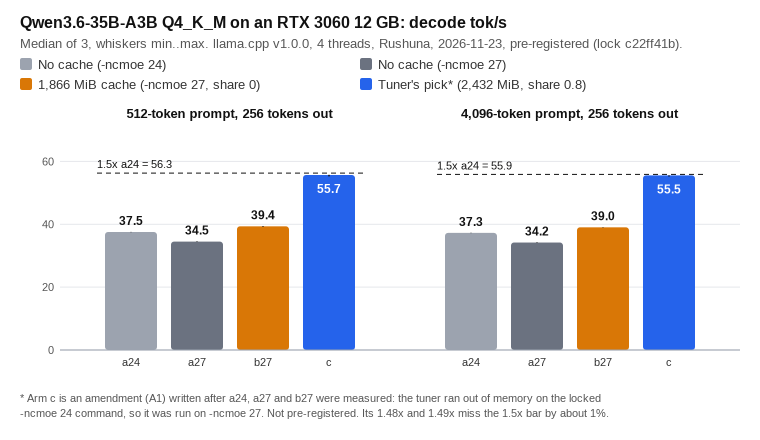
Each arm got one warm-up request, then three measured requests at a 512-token prompt and three at 4,096, each writing 256 tokens. The figure below is the median of three.
Two claims were under test. C1, from the PR thread: the better cache arm decodes at least 1.5x faster than a24. I wrote “at least 1.5x” rather than “2x” because that’s what the owners’ own numbers support (1.78x on a 3070, 1.53x on a 2080 Ti, 1.38x on a 5060 Ti). C2, from a YouTube video built on the 2080 Ti report: a small cache is slower than no cache. On that owner’s card, a 2.7 GB cache dropped decode from 42 to 23.5 tok/s.
My predictions, written before the build: the tuned cache lands at 1.1x to 1.3x over a24, so C1 fails; and the cache alone is no faster than a24.
Results
| Arm | Cache | Decode, 512 prompt | Decode, 4,096 prompt | Prompt processing, 4,096 | Card memory peak |
|---|---|---|---|---|---|
| a24 | none | 37.53 (37.48-37.57) | 37.26 (37.19-37.28) | 399.0 | 10,395 MiB |
| a27 | none | 34.50 (34.40-34.55) | 34.20 (34.08-34.23) | 362.4 | 9,017 MiB |
| b27 | 1,866 MiB, share 0 | 39.37 (39.12-39.37) | 39.03 (38.96-39.10) | 406.7 | 10,901 MiB |
| c, amended arm (A1, post-results) | 2,432 MiB, share 0.8 | 55.67 (55.23-55.74) | 55.54 (55.20-55.55) | 424.7 | 11,471 MiB |
Decode and prompt processing in tok/s, median of 3 (min-max). No cell was voided. All 28 answers were coherent, PCIe stayed at gen 3 x16, swap was off by design, and free RAM never dropped below 28 GB.
The cache alone: about 5%
Moving three expert layers to RAM cost 8% (a27 against a24). Adding the 1,866 MiB cache at that split won back 14% (b27 against a27). Net, the cache-alone setup beats my best no-cache setup by 4.9% and 4.8%. The ranges don’t overlap, so it’s a real difference, but it sits inside the ±5% band I’d set in advance as “no meaningful change”.
C2 didn’t show up. The small cache was faster than no cache at the same split, not slower. The 2080 Ti report was a different setup, with every expert on the CPU and a larger Q6 file, so this doesn’t say that owner was wrong. It says the slowdown didn’t happen here.
The tuner’s pick: 1.48x, and C1 still fails
The tuner recommended --moe-cache-mib 2432 --moe-cache-cpu-share 0.8, meaning a bigger cache with 80% of misses
sent to the CPU. That setup, the amended arm (A1, post-results), decoded at 55.7 and 55.5 tok/s:
1.483x and 1.491x a24. C1 needed 1.5x. It fails at both lengths, short by 1.1% and 0.6%. That’s close, and it’s
close to the 1.53x the 2080 Ti owner got, but a miss is a miss.
Against the cache-alone arm b27, the amended arm (A1, post-results) is 1.41x and 1.42x faster. Don’t read that as “the CPU share is worth 41%”. The cache size changed too, from 1,866 to 2,432 MiB, so the 41% is the larger cache and the CPU share together, and this test can’t split them. The tuner’s own grid hints that the share does most of the work: at 2,432 MiB it measured 46.6 tok/s with share 0 and 58.3 with share 0.95.
The tuner predicted 58.2 tok/s for its pick. My measured runs came in 4.4% and 4.6% under that, which is about what you’d expect from 256-token decodes against its own short calibration runs.
Prompt processing improved less: the amended arm (A1, post-results) is 8% faster than a24 on the 512 prompt and 6% on the 4,096 one.
Why arm c is an amendment, and what that means for the number
The arm I locked was the tuner run on the a24 command, the one a reader with this card is already running. It didn’t
run. The tuner’s first calibration server always allocates a cache of 10% of the expert weights, 1,856 MiB here,
before it checks how much room the card has, and its --max-mib cap doesn’t apply to that first run. The a24 command
already uses 10,367 MiB at load, so there was no room left for the 392 MiB compute buffer:
CUDA0 MoE cache size =  1856.00 MiB for 11136.00 MiB of host experts, 0% of the misses on the CPU
ggml_backend_cuda_buffer_type_alloc_buffer: allocating 392.00 MiB on device 0: cudaMalloc failed: out of memory
That’s an annoying way to fail. The tool exists to work out what fits on your card, and it falls over before it looks. The run stopped there. After seeing a24, a27 and b27, I wrote an amendment: run the tuner on the a27 command instead, which leaves about 2.9 GB free, take its recommendation verbatim, and label every figure from it as post-results. So the 1.48x is not a pre-registered result. I picked the a27 command knowing the other three arms’ numbers, though not what the tuner would choose or how fast it would run. Weigh it accordingly.
The out-of-memory behaviour was raised in the PR’s review on October 27, in a comment on that line of the script. It got no reply, the PR merged unchanged, and the script hasn’t been touched since. As of November 23 there’s no issue or fix.
The recipe for a 12 GB card
This is what worked on my 3060 with this file. The principle carries over: give the tuner enough free VRAM for its first run, then use what it recommends.
1. Find your best no-cache fit. For this model on a 12 GB card that was -ncmoe 24. Note its load peak in
nvidia-smi.
2. Free up room for the tuner’s first run. It needs about 10% of the model’s expert weights for the cache plus
roughly 400 MiB for the compute buffer, on top of the model’s own load. For this 22 GB file that’s 1,856 + 392 =
2,248 MiB. A rough rule from this one file: about 9% of the GGUF’s size plus 400 MiB. Each extra -ncmoe step freed
about 460 MiB here, so three steps (24 to 27) did it, with 2,936 MiB free at load.
3. Run the tuner on that command. From the llama.cpp source tree, with a fresh output directory:
python3 scripts/moe-cache-tune.py --out tune-3060 -- \
  ./build/bin/llama-server -m Qwen3.6-35B-A3B-UD-Q4_K_M.gguf \
  -ngl 99 -ncmoe 27 -fa on -c 16384 -np 1 --fit off -lm mmap -t 4 --port 8081
It took about 7 minutes and ended with:
recommended: --moe-cache-mib 2432 --moe-cache-cpu-share 0.8 (58.2 t/s, 47.0 with share 0)
4. Append its two flags to the same command and run that:
./build/bin/llama-server -m Qwen3.6-35B-A3B-UD-Q4_K_M.gguf \
  -ngl 99 -ncmoe 27 -fa on -c 16384 -np 1 --fit off -lm mmap -t 4 --port 8081 \
  --moe-cache-mib 2432 --moe-cache-cpu-share 0.8
A few notes from the run:
- Keep
--fit off. Fit doesn’t account for the cache, so leaving it on can move layers under you. - Use your physical core count for
-t. The CPU share puts real work on the CPU. Four threads matched this i7-7700’s four cores. - Leave a margin. The tuned arm peaked at 11,471 MiB of 11,909 usable. A bigger context or a display on the same card can tip that over.
- Re-run the tuner if you change the command. Its pick depends on the exact split, context and machine, and it reuses the output directory for an identical command, so give it a fresh one.
My predictions, scored
Both missed.
- Tuned cache at 1.1x to 1.3x over a24: miss. The amended arm (A1, post-results) landed at 1.48x and 1.49x, well above my range. I’d assumed a 4-core CPU on DDR4-2133 was too weak to take much off the PCIe bus. It wasn’t.
- Cache alone no faster than a24: miss. b27 was 4.9% and 4.8% faster with non-overlapping ranges. I scored this one on faster or slower, as written in the lock, so a gain inside the ±5% band still counts against me.
What this doesn’t tell you
This is one model, one quant and one card. The thread’s biggest gains came with every expert on the CPU (-cmoe)
and on other files. Here 27 of 40 layers had their experts in RAM, so the cache only acted on part of them.
Your CPU matters more than usual. The CPU share works because the processor reads experts faster than PCIe uploads them, so a faster CPU or DDR5 might gain more and a slower one less. I haven’t measured either.
A 24 GB card doesn’t need any of this. On a 3090 this file fits entirely on the card, no experts sit in RAM, and the cache has nothing to do. That’s why there’s no 3090 arm.
And the runs are short: 256-token decodes, three per cell. The tuner’s grid is reported beside my numbers and never mixed into them.
The bottom line
If you’re running a 35B MoE on a 12 GB card, the tuned cache is worth ten minutes of your evening. On my 3060 it took this model from about 37 to about 55 tok/s. That’s the amended arm (A1, post-results), not a pre-registered result, and it’s 1.5x at best, not 2x. Don’t bother with the cache alone at the default share: about 5% isn’t worth the VRAM. And before you run the tuner, push a few more expert layers to RAM, or it will crash before it measures anything.
The full record, with every log, the harness and both versions of the lock, is on the public mirror, and the pre-registration with Amendment A1 shows exactly what was locked before the run and what was added after.
A weekly email with every new guide and measured benchmark.
Subscribe — free, no spam