How to Fix Slow Qwen 3.6 27B on RTX 3090 (10-80 tok/s)
📚 More on this topic: Complete Qwen Models Guide · DFlash on RTX 3090: both Qwens benched · Qwen 3.6 Complete Guide · llama.cpp vs Ollama vs vLLM · VRAM Requirements
You spun up Qwen 3.6-27B on your RTX 3090, expecting the 35-80 tok/s you read about on r/LocalLLaMA, and you’re sitting at 12. Maybe 18 on a good run. The model works, the output is fine, but something is wrong with the speed.
This is a real problem with real fixes. The r/LocalLLaMA can’t-replicate thread ran 64 comments deep and surfaced the actual causes. Most are config issues that take a minute to fix. A couple are architectural. One is a backend choice with real tradeoffs. Work the list in order.
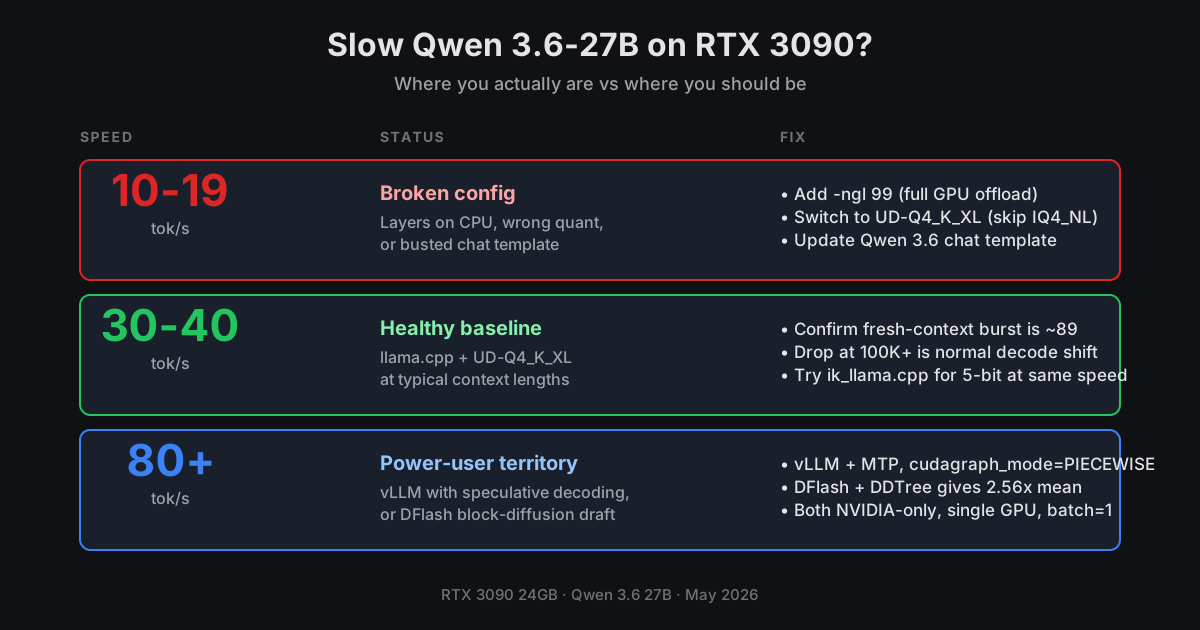
Quick reference
| Symptom | Likely cause | Fix |
|---|---|---|
| 10-15 tok/s, partial offload | Layers on CPU | -ngl 99 explicit |
| 15-20 tok/s, full offload | Wrong quant or template | UD-Q4_K_XL + fixed template |
| 25-30 tok/s sustained | Backend tradeoff | Try ik_llama.cpp |
| ~38 fresh, ~35 at 32K | Normal prefill→decode shift (re-benched June 10 on Miu, llama.cpp f9cd456ea) | Working as expected |
| Single 3090 OOMs loading 128K context | 32K works, 128K OOMs (flash-attn KV alloc fails even with Q8 KV cache); the cutoff in between wasn’t benched — likely 48-64K based on memory math | Drop ctx well below 128K or tensor-parallel across two cards |
| 15-second prefill on every multi-turn reply | Hybrid-model context-checkpoint bug (Issue #22746) | Update llama.cpp — fix is in mainline |
| Want ~1.28× more (firsthand) | llama.cpp + MTP via the llama-mtp fork — 48.9 tok/s on Miu; community reports 1.7-1.85× | See Step 8 |
| Want even more | DFlash speculative decoding | See DFlash bench |
1. Verify full GPU offload
The first thing to check, every time. Look at the loader output.
load_tensors: offloaded 65/65 layers to GPU
If the first number is anything less than the second, you have layers on CPU and you’ll never hit the speeds you want. Add -ngl 99 (or --n-gpu-layers 99) explicitly. The default in some llama.cpp builds is 0 if you didn’t specify, which silently puts everything on CPU. Multiple users in the thread reported “I’m at full GPU offload, why so slow” and the answer was that they weren’t.
./build/bin/llama-server \
  --model qwen3.6-27b-UD-Q4_K_XL.gguf \
  -ngl 99 \
  --flash-attn on \
  ...
-fa on is also worth confirming. Flash attention shaves a measurable amount off generation time on the 3090 and is on by default in recent builds, but old configs sometimes carry it as off.
2. Reboot to clear VRAM fragmentation
Stupid. Real. After a long uptime with multiple model loads and unloads, NVIDIA’s driver can leave VRAM fragmented enough that a 17 GB Q4 model won’t allocate cleanly. The model still loads, but layers spill or contiguous memory pressure slows the kernels.
Three confirmations of this in the thread. One user reported a 20% speed jump after a reboot with no other changes. If you’re getting weird numbers and nvidia-smi shows your VRAM allocated but the model loaded “successfully,” reboot first and rerun. Costs you 60 seconds.
3. Quant choice matters more than people think
Not every Q4 is the same. The Unsloth Dynamic quants are calibrated against an importance matrix and they’re noticeably better quality at the same speed than the bartowski or default GGUFs. Use UD-Q4_K_XL as the default. UD-Q4_K_M is the smaller variant if you need the headroom.
What to avoid: IQ4_NL is the worst Q4 variant for Qwen 3.6-27B according to multiple thread comments. The non-linear quant scheme that works on Llama-class dense models loses ground on the hybrid Gated DeltaNet attention path Qwen uses. Slightly slower, noticeably worse output. Skip it.
If you’re at 16 GB or below and need a smaller quant, Q3_K_M is the fallback. Below that, output quality drops fast on the 27B.
4. The chat template is broken in many builds
This one bit a lot of people. Qwen 3.6 changed the chat template from 3.5, and several llama.cpp distribution builds shipped with the wrong embedded template. Symptoms: gibberish, missing tokens, the model talks to itself, refuses to stop generating, or throughput numbers are technically fine but the output is garbage.
Fix: pull the current Jinja template from the Qwen 3.6-27B model card and pass it explicitly with --jinja --chat-template-file qwen3.6.jinja. Or grab a known-good one from the Unsloth GGUF repo’s tokenizer config. Update as of June 10: the major distributors (Unsloth, bartowski, ggml-org, LM Studio community) now all ship the correct template; the broken-template problem mostly hit early-May GGUFs and custom fine-tunes. If you re-pulled from a major distributor in the last few weeks, you’re probably fine — but if your output is gibberish, the template is still the first thing to check.
If you’re using LM Studio, check the model card’s “Prompt Template” field and override if it doesn’t match Qwen’s official format. Bad templates can also wedge the thinking-mode tags, so reasoning output disappears or leaks into the user-visible response.
5. Power limit on the 3090
Some 3090 cards ship with 320W or 350W power caps below the reference 350W spec, and aftermarket boards on shared power supplies sometimes get throttled by the user. Run:
nvidia-smi -q -d POWER | grep -i "power limit"
Look for Current Power Limit. If it’s well under 350W, you’re leaving speed on the table. The dense 27B is compute-bound at decode time on the 3090, and a 320W cap is roughly an 8-12% throughput hit. Not catastrophic, but if you’re chasing the difference between 30 and 35 tok/s, this matters.
To raise it (with appropriate cooling and PSU):
sudo nvidia-smi -pl 350
Don’t go over the rated TDP for your specific card. Founders Edition is 350W. Some AIB cards are higher. Check the spec.
6. Sustained vs initial throughput
This one isn’t a bug. People misread the numbers.
Qwen 3.6-27B on a 3090 with UD-Q4_K_XL hits ~38 tok/s fresh-context and drops only slightly to ~35 tok/s at 32K sustained. That’s the actual prefill-to-decode shift on a current llama.cpp build — flatter than the “80+ fresh, 30 sustained” framing you’ll see in some Reddit reports. Decode is dominated by KV cache reads, and on a single 24GB card the wall is memory bandwidth, not compute.
A myth worth busting: 128K context does NOT fit on a single RTX 3090 at Q4_K_XL. The flash-attn KV buffer allocation OOMs even with Q8 KV-cache quantization. What I actually measured: 32K works cleanly (35 tok/s sustained, above); 128K OOMs on load. I did not bench the exact cutoff — the boundary is somewhere in between, likely around 48-64K based on KV-cache memory math, but treat that as an estimate, not a measurement. If you need more than 32K, the honest move is to bench your own ceiling on your own rig. The “~30 tok/s at 128K” number that floated around the original thread (and around earlier versions of this article) was either someone’s tensor-parallel-across-two-cards setup or aspirational. If you genuinely need 128K, you need either two 3090s with tensor parallelism or a 32GB+ card. Plan your context budget conservatively until you’ve benched your own ceiling.
When Reddit posters quote “80 tok/s on 3090,” they’re often quoting fresh-context burst on lighter quants (Q3 or below) or with speculative decoding enabled. With UD-Q4_K_XL at real conversation lengths, ~35 tok/s at 32K is the honest sustained number. Set your expectations there and you’ll stop chasing a phantom.
If you want higher sustained speed than the baseline, the path is speculative decoding — and as of May 4 it’s no longer a vLLM-only question. See Step 8.
Numbers above measured on Miu (RTX 3090), June 10, 2026, llama.cpp f9cd456ea, Qwen3.6-27B-UD-Q4_K_XL.gguf.
7. Known issue: multi-turn freezes on hybrid models (fix in current llama.cpp)
This one wasn’t in the original list because the fix landed after publication. If you’re running multi-turn conversations on Qwen 3.6 27B and seeing prefill take ~15 seconds per turn on a 15K-token history (instead of the milliseconds you’d expect from a proper cache hit), you’ve hit Issue #22746. Hybrid/recurrent models were forcing full prompt re-processing on every turn because context-checkpoint restore wasn’t wired up for the DeltaNet/Mamba path. The fix shipped into mainline through May. If your multi-turn agentic workflows felt unusable, update llama.cpp — this bug specifically affected hybrid SSM models like Qwen 3.6. Standard transformer models weren’t affected.
8. Backend choice: llama.cpp, llama.cpp + MTP, ik_llama.cpp, or vLLM
This is where the gap between “slow” and “fast” stops being a config issue and becomes a tradeoff.
llama.cpp baseline. UD-Q4_K_XL on a 3090 lands at 38 tok/s fresh and 35 tok/s sustained at 32K — re-benched June 10 on Miu against llama.cpp f9cd456ea. The 30-40 baseline I cited at publication holds up: I re-ran this on current main and the number is still right. If you’re seeing 80+, you’re either measuring fresh-context burst on a lighter quant or running speculative decoding. If you’re below the 30-40 floor, the problem is in steps 1-6. Measured on Miu (RTX 3090), June 10, 2026, llama.cpp f9cd456ea.
llama.cpp + MTP via the llama-mtp fork. PR #22673 merged MTP head support into mainline llama.cpp the week after this article first published. One important caveat surfaced in the re-bench: mainline’s speculative-decoding path is draft-model based and does NOT auto-consume the embedded MTP head from an MTP-tagged GGUF. To use the MTP head as the draft source, you need the llama-mtp fork with --spec-type draft-mtp. Mainline’s PR #22673 means the MTP head loads; using it for specdec needs the fork.
On Miu I measured 48.9 tok/s with RDson’s Qwen3.6-27B-MTP-Q4_K_M GGUF, draft acceptance ~23% (869 drafted, 199 accepted) — 1.28× over my 38 tok/s autoregressive baseline. That’s a real gain but materially lower than the community-reported 1.7-1.85× (38 → 65 tok/s in one independent bench, 23 → 42 in another). Acceptance rate varies by quant, by GGUF, and by prompt structure — and the hype outpaces the floor. Expect somewhere between 1.2× and 1.85× depending on your setup; bench it on your own rig before committing to a stack rewrite.
For the flag walkthrough, see Dre Dyson’s MTP llama.cpp guide. Other Qwen 3.6 27B MTP GGUFs worth knowing: Unsloth’s MTP build and havenoammo’s UD variant. MTP firsthand number measured on Miu (RTX 3090), June 10, 2026, llama.cpp f9cd456ea + llama-mtp fork, RDson Qwen3.6-27B-MTP-Q4_K_M.
ik_llama.cpp. A llama.cpp fork with custom kernels for hybrid SSM models. Running sokann/Qwen3.6-27B-GGUF-5.076bpw (a 5-bit quant tuned for the fork) at full GPU offload, users in the thread report 31-39 tok/s decode at 128K context — comparable to llama.cpp at 4-bit but at 5-bit quality. If you’re VRAM-comfortable and want better output without the speed hit, this is the path. The fork also supports MTP heads.
vLLM. Still the production-serving path if you’re running a real service with batching, an OpenAI-compatible endpoint, and continuous batching. For specdec specifically, vLLM + MTP at TurboQuant 3-bit NC weights reportedly hits 82 tok/s sustained on a 3090 at 125K context — but with MTP now in mainline llama.cpp, the vLLM choice is about serving architecture, not about whether you can get specdec at all. Critical detail if you do go vLLM + MTP: do not use cudagraph_mode=FULL. It produces garbled output. Use cudagraph_mode=PIECEWISE. The depth comparison is in llama.cpp vs Ollama vs vLLM.
The honest read: most people running into “slow” issues on llama.cpp don’t actually need any of these alternatives. They need their template fixed. But if you’ve got the diagnostic baseline solid and want more speed, llama.cpp + MTP is now the lowest-friction path — same tool, drop in the MTP GGUF, no new runtime to install.
9. The SSM hybrid CPU quirk
The deepest cause, and the one most users do not have. Qwen 3.6 is a hybrid SSM architecture. Three Gated DeltaNet layers per Gated Attention layer. The DeltaNet recurrence step uses a small CPU-side compute buffer (around 552 MiB labeled CUDA_Host buffer in the loader output). On older CPUs without AVX-VNNI or AVX-512 (i9-9900K, i7-6700K, anything pre-2019 Intel), this bookkeeping path becomes a real bottleneck on a fast GPU.
You’ll see graph splits = 2 in the llama.cpp startup log and a small per-token CPU cost that matters when the GPU is doing 30+ tok/s. Newer CPUs (i7-12700K and up, Ryzen 5000+) close this gap and the SSM cost falls into the noise.
The original Reddit OP’s Claude analysis of this bottleneck was directionally right but overstated. The CPU cost is real for SSM hybrid models, but it isn’t the dominant factor for most users. If you’re on a modern CPU and you’re slow, the issue is in steps 1-7. If you’re on a 2018-era CPU and stuck at low-20s with everything else clean, this is finally where you’ve bottomed out architecturally.
There’s no software fix. CPU upgrade is the answer. If that’s not on the table, switch to vLLM, which handles the hybrid path differently and is less sensitive to CPU vintage.
After all that, want another 2x?
If your 30-40 tok/s baseline is now solid and you want more, DFlash speculative decoding is the next step. I built and ran the bench on my own 3090 on April 30 — 2.56× mean speedup for Qwen 3.6-27B Q4_K_M against autoregressive on the same card, moving a healthy 32 tok/s baseline to a healthy 84 tok/s. NVIDIA only, sm_86+, single GPU, batch=1. These numbers are as measured on Miu (RTX 3090), April 30.
Since then a different DFlash implementation has appeared: BeeLlama v0.2 DFlash, a llama.cpp fork tuned for hybrid SSM specdec. Independent reports from dasroot.net cite 4.9× speedup, 164 tok/s on RTX 3090 for Qwen 3.6 27B — substantially higher than my April 30 bench, but a different fork and a different setup. I haven’t re-benched against BeeLlama on Miu yet; the BeeLlama number is community-reported, not mine. Worth checking out if you’ve already got the diagnostic baseline solid and want to push further.
DFlash (either flavor) is worth doing only after the checklist above. If your baseline is broken, DFlash is going to 2× (or 5×) a broken baseline. Get the simple stuff right first, then optimize.
The honest summary
Most “slow Qwen 3.6 on 3090” reports come down to one of three things:
- Layers on CPU because
-nglwasn’t set. One flag fix. - Bad quant or bad template. Switch to UD-Q4_K_XL and update the Jinja template.
- Wrong expectations. 80 tok/s is a fresh-context burst, not your sustained speed at 32K.
Steps 4-7 catch the next tier. Step 8 is a real architectural ceiling but it’s the minority case. Work the list top to bottom and you’ll find your bottleneck within 30 minutes.
The community thread is what made this list possible. Sixty-four comments of frustrated developers helping each other debug, and the answers shook out into the order above. If you find a new failure mode that isn’t covered here, that’s the place to post it.
Related guides
A weekly email with every new guide and measured benchmark.
Subscribe — free, no spam