A100 vs H100 vs L40S vs 4090: Why the Cheaper GPU Costs More to Train On
Related: How Much It Costs to Run LLMs Locally · GPU Buying Guide for Local AI · VRAM Requirements · Fine-Tuning: LoRA & QLoRA · Multi-GPU: Worth It? · Local AI vs Cloud API Cost
Contents
- The invoice lies
- The total-cost table
- Why speed compounds on a fixed-FLOP job
- The cheap trap: 4090 and A6000
- The false economy: L40S
- The workhorse: A100
- The sweet spot: H100
- The overkill: H200
- Should you just buy a 4090?
- Where this breaks
- Bottom line
We rented an A100 and an H100 back to back to train a 1.5B proto, and the bill taught me something the spec sheets don’t. The A100 was cheaper per hour. The H100 was cheaper per run. Same job, same tokens, and the “expensive” card came out ahead on total cost, because it finished in half the wall-clock.
That’s the whole game with training rentals, and almost every “cheapest GPU” post gets it wrong by stopping at the hourly rate. A fixed-FLOP job is a set number of tokens through a set model, and it doesn’t care what you pay per hour. It cares what you pay to finish. And when a card is twice as fast, every hour you don’t rent is money you don’t spend.
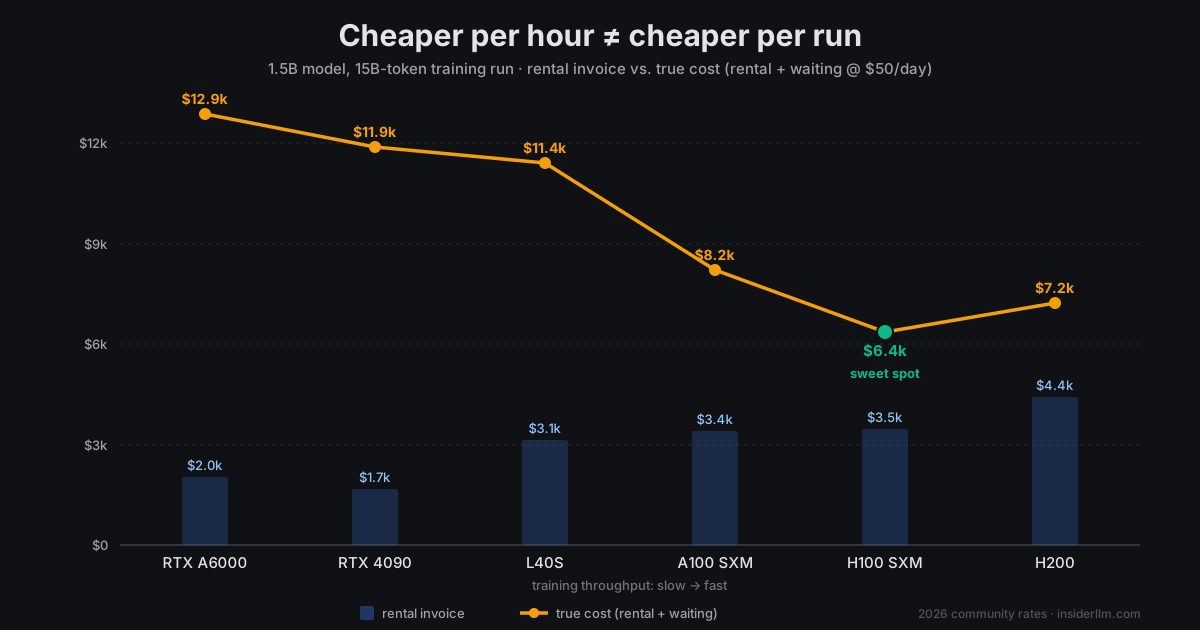
Here’s the U-curve, with current rental prices and the throughput I actually measured. The cheap end and the expensive end both lose. The bottom is narrower than you’d think.
The invoice lies
Pull up any GPU cloud and sort by price. In mid-2026 you’ll see something like a $0.34/hr RTX 4090 on community tier, a $0.39/hr A6000, an L40S under a buck, and the A100/H100/H200 stacked above them. If the invoice were the whole story, you’d rent the 4090 and never look back.
Now do the run. Our 1.5B model on 15B tokens is a real pretraining-scale job: small by frontier standards, but big enough that it takes weeks, not minutes. That time is the hidden line item. A card that’s a third the price but a fifth the speed doesn’t save you money; it hands you a five-month babysitting project on hardware with no uptime guarantee.
So the honest way to price a training run isn’t dollars per hour. It’s dollars to done, plus the cost of the wait. Put both on one axis and the cheap cards float up, the H200 floats up, and the middle sinks. That’s the U.
The total-cost table
Prices below are representative community/spot-tier on-demand rates in mid-2026, the same cheap tier where we rented our A100 at about $1.47/hr. I’ve kept the whole table on that tier so it’s apples-to-apples. Throughput is tokens/sec on our 1.5B proto: the A100 (1,800 tok/s) and H100 (~3,000 tok/s, measured on the FSA step bench at seq 1024, batch 2, with our selection-attention speedup enabled) are firsthand; the rest are scaled from real mixed-precision training throughput, not spec-sheet TFLOPS.
| GPU | VRAM | $/hr | tok/s | GPU-hours | Wall-clock | Run cost |
|---|---|---|---|---|---|---|
| RTX 4090 | 24GB | $0.34 | 850 | 4,900 | 204 days | $1,670 |
| RTX A6000 | 48GB | $0.39 | 800 | 5,210 | 217 days | $2,030 |
| L40S | 48GB | $0.79 | 1,050 | 3,970 | 165 days | $3,135 |
| A100 SXM | 80GB | $1.47 | 1,800 | 2,315 | 96 days | $3,400 |
| H100 SXM | 80GB | $2.49 | 3,000 | 1,390 | 58 days | $3,460 |
| H200 | 141GB | $3.30 | 3,100 | 1,344 | 56 days | $4,435 |
Read the invoice column and the 4090 wins by a mile. Read the wall-clock column and it falls apart: 204 days on a preemptible community card is not a plan, it’s a hope. The A100 and H100 land within 2% of each other on the invoice ($3,400 vs $3,460), but the H100 gets you there 38 days sooner. When the bill is a tie, the faster card wins for free.
The U shows up the moment you put a price on the wait. In the chart above I used a deliberately conservative $50/day, a small fraction of what an idle ML engineer or a stalled research cycle actually costs. Even at that low rate, the true-cost line dives from ~$12,900 (A6000) down to ~$6,400 (H100) and back up to ~$7,250 (H200). Set your cost-of-waiting to zero and the U flattens into the invoice: buy the 4090 and enjoy your six-month run. Set it to anything realistic and the H100 is the floor.
Why speed compounds on a fixed-FLOP job
Inference and training price out differently, and it trips people up. For inference or dev work you rent by the hour and stop when you’re done thinking, and a cheap card that’s “fast enough” is genuinely the right call. A training run is the opposite. The work is fixed: 15 billion tokens have to pass through the model no matter what. Your only lever is how fast you push them.
So throughput isn’t a nice-to-have, it’s a divisor on the entire bill. Double the tok/s and you halve the GPU-hours, which halves both the rental and the wait. That’s why a card that costs 70% more per hour (H100 over A100) but runs 67% faster comes out even on cash and way ahead on time. The hourly premium and the speedup nearly cancel; the wall-clock saving is pure upside.
It also means you can’t cheap your way out with quantity. “I’ll just rent eight 4090s” runs straight into the interconnect wall. Consumer cards have no NVLink, so data-parallel training scales badly over PCIe, and community clouds won’t hand you eight of them wired together anyway. The fast card isn’t just faster per GPU; it’s the only way to buy a short wall-clock at all.
The cheap trap: 4090 and A6000
The 4090 has the lowest invoice on the board and it’s still the worst deal for this job. Three reasons, in order of how much they hurt:
First, wall-clock. At ~850 tok/s a single 4090 needs about 200 days to chew through 15B tokens. Nobody runs a 200-day job on a card you rent by the second with a 15-second reclaim notice. You’d checkpoint constantly, lose progress to preemptions, and spend more of your life restarting than training.
Second, VRAM. A 1.5B model in mixed-precision Adam wants room for parameters, gradients, and two optimizer moments in fp32, which is north of 24GB before activations. The 4090’s 24GB doesn’t hold it cleanly, so you’re into gradient checkpointing (a throughput tax) or micro-batches so small the GPU idles. The VRAM math that works for inference does not work for training the same model.
Third, no scale-out. As above: you can’t NVLink your way to a reasonable wall-clock.
The A6000 fixes exactly one of these (48GB fits the job) and is slower and pricier than the 4090 for the privilege. It’s the highest true-cost card on the chart. Great for fine-tuning and LoRA runs that fit in a day; wrong tool for a multi-week pretraining job.
The false economy: L40S
The L40S is the one that fools careful people. It’s a real data-center card, 48GB, Ada-generation, and it rents for well under an A100. On paper it looks like the value play.
Then you clock it. No NVLink, memory bandwidth well short of an A100’s, and for our run it lands around 1,050 tok/s, barely faster than the consumer cards. So you pay near-A100 money on the invoice ($3,135) and wait five and a half months instead of three. On the community tier it’s a little cheaper than the A100; the moment you move to secure/on-demand pricing (more on that below), the gap closes and you’ve bought yourself two extra months of runtime for nothing. It’s cheaper per hour and worse per run — the exact trap this whole piece is about, in one card.
The workhorse: A100
The A100 80GB is the honest baseline, and it’s where our firsthand numbers start. At ~1,800 tok/s and about $1.47/hr community, our 15B-token run came in around $3,400 over roughly 96 days of wall-clock. Nothing about that is bad. It fits the model with headroom, the SXM version has real NVLink for scaling, and it’s the most widely available serious training card on every cloud.
If the H100 is sold out or your provider gouges on it, the A100 is a completely defensible pick: same ballpark cost, just slower. The only reason it isn’t the winner is that the H100 matches its bill and beats its clock.
The sweet spot: H100
Here’s the result that made me write this. The H100 SXM rented for about $2.49/hr community, 70% more per hour than our A100. It also ran our proto at ~3,000 tok/s versus the A100’s 1,800, measured on the same bench. Do the division: 15B tokens finished in about 1,390 GPU-hours, or $3,460, a rounding error above the A100’s $3,400, in 58 days instead of 96.
That’s the compounding in one line. The hourly premium and the throughput gain nearly cancel on cash, and you pocket 38 days of wall-clock. For a research loop where the run is the iteration cycle, 38 days isn’t a rounding error. It’s the difference between two experiments this quarter and one.
One honest note on the throughput: 3,000 tok/s is “only” 1.67x the A100, not the 2x+ the H100 hits on big dense batches. That’s because our bench runs at seq 1024, batch 2, a small workload that doesn’t saturate the H100’s compute. On a wider run the gap grows, which only pushes the H100 further into the lead. If anything, this table undersells it.
The overkill: H200
The H200 is the same GH100 die as the H100 with identical compute, paired with more and faster memory: 141GB of HBM3e at roughly 4.8 TB/s versus the H100 SXM’s 80GB of HBM3 at ~3.35 TB/s. For a frontier model that’s memory-bound, that bandwidth matters. For a 1.5B model that already fits an H100 with room to spare, it buys you almost nothing. Our estimate is ~3,100 tok/s, a few percent over the H100, because the run was never memory-starved to begin with.
So you pay ~30% more per hour ($3.30 vs $2.49) for ~3% more speed. The invoice climbs to $4,435 and the wall-clock barely moves. This is the right edge of the U: paying for capability the job can’t use. The H200 earns its price on 70B-plus training and long-context work. On a small proto it’s a way to spend an extra grand for a day.
Where this breaks
This table holds for one specific job. Here’s where it doesn’t.
This is a fixed-FLOP training job, and only that. For inference, interactive dev, or any short run you stop by hand, the logic inverts completely, and the cheap card that’s “fast enough” wins, because there’s no giant fixed workload for speed to compound over. Don’t take this table to a serving decision. That’s a different cost model entirely.
VRAM sets a hard floor. All of this assumes the model fits. The 4090’s real problem wasn’t speed alone, it was 24GB. A bigger model moves every card up a tier and can knock the small ones off the board completely. A 7B or 13B training run rules out the 24GB cards before throughput even enters the conversation. Check the fit first.
Pricing tier moves the whole table. These are community/spot rates: cheap, but preemptible with no SLA. Secure and on-demand tiers, the ones you’d actually use for an uninterrupted multi-week run, run roughly 1.5–2x these numbers across the board. That doesn’t change the shape of the U (every card scales up together), but it changes the absolute dollars, and it makes the cheap-card wall-clock problem worse, not better. You’re now paying more to babysit a preemptible marathon. If you need reliability, price the secure tier and the H100’s lead widens, because you’re paying the premium for fewer hours.
Should you just buy a 4090?
If renting a 4090 is a trap, owning one sounds like the fix: no hourly meter, no preemptions, your card sitting under your desk. I ran the numbers on my own rig here in Berkeley, and for this job it doesn’t hold up — because of where I live.
A used 4090 in a training-capable box runs about $2,500–3,000 all-in. That’s the easy part. The part people skip is the power bill. My rig pulls around 600W at the wall under a sustained training load, and PG&E is brutal: my blended rate lands near $0.45/kWh (E-1 baseline is 42.5¢, E-TOU-C peak hits 59¢). Run that 4090 flat-out for the same ~204 days the job needs and you burn roughly 2,900 kWh, or about $1,300–1,700 in electricity to train the model once.
Add it up. Call it $3,800–4,700 to own the card and push one pass through it, against ~$3,460 to rent an H100 that finishes 3.5x sooner. In Berkeley, buying hardware to train a single time costs more than renting the better card, and you wait months longer for the privilege.
Here’s the honest flip side: that’s a PG&E result, not a law of physics. Move to a $0.10/kWh hydro state like Washington or Idaho and the same run costs about $290 in power. Own the rig, train on it over and over, and the math inverts: the hardware amortizes and cheap electricity makes each additional run nearly free. If your power is cheap and you’ll train more than a couple of times, owning a 4090 is a real strategy. If you’re paying California rates for a one-off, rent.
Bottom line
Rent the fastest card your model actually fits on, and stop optimizing the hourly rate. For our 1.5B/15B-token run that’s the H100 SXM: same invoice as an A100, done in 38 fewer days, and it only extends its lead on bigger jobs. The A100 is the fine fallback when the H100 isn’t there. Everything cheaper is a false economy paid in months of wall-clock, and the H200 is a premium for headroom a small model never touches.
The cheapest GPU per hour and the cheapest GPU per run are almost never the same card. Price the run, not the hour.
A weekly email with every new guide and measured benchmark.
Subscribe — free, no spam